Showing posts with label Twitter. Show all posts

Sunday, 15 July 2018

NZ MIE Expert Hui 2018 notes Day 2

My notes from Day 2 - great weekend with amazing educators.

Session 1 (via Skype) Sustainable Development Goals - Koen Timmers


Top 10 global teacher prize
Looking for things across cultures that make us all the same
Formal education focuses too much on knowledge
Lack of interaction. Need soft skills
Longer you go to school, the less creativity
"Teaching is neither necessary nor sufficient to produce learning" Jean Lave
Don't need a teacher to learn, we can learn by doing
Every child in UK gets a micro:bit
Students learn from each other. Collaborative learning important
Flipped learning by making tutorials and screen cast
Different ages, topics and schools have different needs
"A teacher is a pedagogical engineer who needs to apply the best learning approach to a specific situation."
Climate change and refugees. People getting fed up reading about these.
Kakuma refugee camp in Kenya
Skype lessons. Sent his own laptop to the camp and raised money and got solar panels and more laptops.
Free education by digital means. Not just subjects but connecting them with the opportunity to talk about culture, sport.
So much harder to send own laptop to camp than finding educators to do it for free.
SDGs while in India. Made by UN to make the world a better place.
Launched global education project
#teachsdgs - follow this
Create one video each week that was published each week, then learnt from other children. Used Skype.

Trips, got parents to change at home too
Project based, they choose what they were to learn that day.
Even without devices they could do. Made songs, danced.
More engaged when created own content
Real life learning
Learn global issues from students living in those areas
Use of Skype really important. Lots of Skype calls with experts, for example Celine Cousteau
Technology enhanced learning
Meaningful data
Use green screen to put them in new situations
VR units for same thing, google cardboard
Lego can be used to make stop motion videos
Lifeliqe holo lens free app offers 3d models
Malawi -  grow plants with 90% less water project
Meal worms can eat plastic
They learn a lot from each country when watching the videos

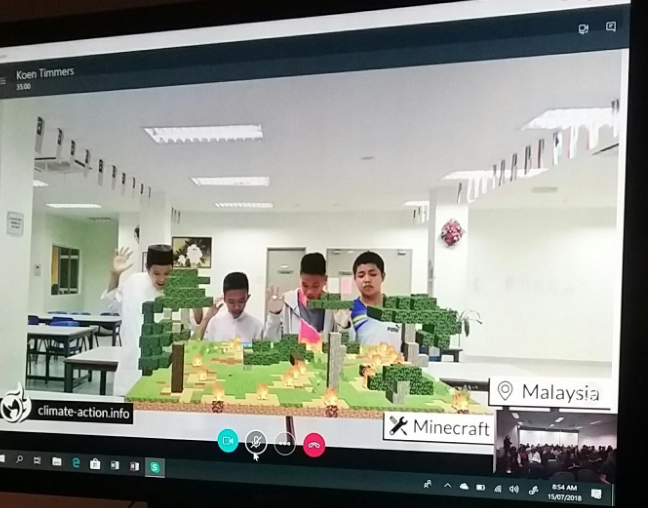
Minecraft in conjunction with free Windows virtual reality app
50 different countries collaborated on eco friendly world climate action project
Students need to move from learning to taking action.
Create mural
Need educators to take part
Sdg projects - Teachers need to exchange ideas
New exciting Innovation coming up that we can't say yet - but won't be far away - we got told and it's really exciting!!!
What can we do for change?
Join http://www.innovationlabs.com/ to get involved in new curriculum
Join project Kakuma
Make own project
More about shifting approach of learning. Focus on learning not on teaching.

Session 2 - Social Media for Educators - Pip Cleaves

Got to be careful online - some real blunders by others - check #hasjustinelandedyet
More than 50%of us use Social Media for teaching
Facebook, YouTube, Blogging, Medium, LinkedIn, Twitter, Instagram, Trip Advisor, Yelp, Snapchat, Tinder, Pinterest
30% use it to communicate with students
Defines who you are online. What is your brand? How am I going to appear online?

Highlight your expertise.
Make a nice header
Increases your credibility
Creates a more rounded image of you
Gives you another way to build relationships
Who are you?
How do you want to be perceived?
How will you leverage your expertise to build your reputation?
What are you going to talk about focus on content and conversation that adds value
Why are you participating in social media? What goals are you trying to achieve?
Where will you participate? Which networks?
How will you use Social Media to shape your brand?
@cpaterso Cameron - has twitter account for yr 9 history class
Posing questions to the world

Don't use it to vent
If your grandmother doesn't want to see it, it is probably not best to have it there.
LinkedIn current photo, areas of expertise.
If you are just getting started: read, like, retweet without comment, then with comment, then chat
Internal Yammer Set up profile within that space first
Newspaper Test - How would I feel if this ended up on the front page of the newspaper?
Whenever she friends someone on fb, check privacy settings and check after updates

Where to go to find good stuff?
Twitter chats
Medium, can follow topics, write blogs on phone
Feedly
Pinterest
Primarystemchat
Tweet meet for #MSFTEduchat18 July about flip grid
Once in a hash tag you can get more sites to look at
Pinterest
Stemsharensw
Steph Westwood
Tweetdeck
Tools for keeping info you get:
One Note
Pinterest
OneDrive - can save links
Twitter Bookmarks

Pip then challenged us to turn ideas into action, by sharing, tweeting and following others.

There were then a range of sessions that we could choose from that were presented by MIE Experts form around the country and overseas. These are the ones I chose:

MIE Session 1 - Virtual Chemistry - Dr Michael Harvey

Realism - new app coming
Gamified 3d  science education platform
Wanted a NZ voice and now have 4alpha testers
Working on how to fit the app into the nz curriculum
Can't afford these things so have a virtual lab
Rocket lab, chemistry and can construct solid fuel rockets
Chem 2.1 and internal
Solution labs
Combining chemicals, more yr 9 and 10
Can see effects in real time
Titration lab
Access to acid and base solutions
Useful to do before a physical titration at school
Alkali metal simulation
Calorimetry lab
Visualisation
Classic Styrofoam cup

Once it is completed, is it for purchase? Not sure how it will roll out.
Can jump on board as beta testing

Minecraft could do some of that at middle school level.
Future would be fireworks lab with exciting electrons of various metals
2 sections, chemistry and rockets
Doing it theoretically in the computer first before doing in the lab.
Gamified with levels and questions, could do as a flipped classroom
Can see student scores in questions
Front end loaded with some content
Set a goal for the experiment and have a learning objective

We launched a rocket which was fun

MIE session 2 - Digital Tech - Carmen Kenton


Digital part of the nz curriculum that was reviewed.
Start off 2020
Focus now on teacher competence. 18 months to get our heads around the new digital curriculum
Differences between Hangarau matihiko and Digital technologies within the nz curriculum
Not the same
Exercise to do:
Carmen gave us a two sided paper. One side process outcomes for computational thinking, other side designing and developing digital outcomes
Which curriculum learning areas does the activity support?
Which progress outcomes best fits the activity?
Collecting pollen
Dance moves
Scavenger hunt
Kapa haka website
All from technology online website
She gave us lots of links to the Digital Tech curriculum

I presented a session on Learning at Haeata (and got an wonderful MIE backpack for doing it), then went to the last presenter session of the day.

MIE session 4 - Digital devices improving pedagogy and student writing performance - Ryan Higgins

Digital devices improving pedagogy and student writing performance
Using one note 2016 changing soon to online version
Little things working well
Modelling books, doing this digitally so people can keep using
Data is huge for change
Pd with external advisors - good to get another voice
Brainstorming ideas - ideas they are trialling in a one note
Broken down into : Use of tech. Engaging with pd. Teaching as inquiry. Modelling. Moderation. Home /school partnership
Inquiry ideas : Exemplars, Tech, Scaffolding vs writing, Analysis, Discussing ideas,Assessment
Using SOLO taxonomy
Knew where they were at before report came out
Used TKI exemplars for writing and students didn't like it so came up with they own.
Best form of exemplars come from students
One note notebook, Cloud storage and linked into teams
IPads used qr code for link on one drive
Making everything a sustainable system

Collaborative Project

The afternoon was given to working together on a Collaborative Project. They put us into groups of 3-4 and gave us this task:
Design a learning activity that: 
  • uses a single component of the ‘Computational Thinking Model’  
  • applies this component to one ‘Sustainable Development Goal’ 
  • produce a learning activity using the template in your Collaborative OneNote. 
  • Record a 90 sec video describing your learning activity idea.  

Our group used the following:
Computational Thinking and Sustainable Development Focus Area 
Computational Thinking Component: Decomposition
Sustainable Development Goal: Biodiversity
Specific Sustainable Development Specific Goal 
Take urgent action to end poaching and trafficking of protected species of flora and fauna (animals) and address both demand and supply of illegal wildlife products 

We designed some activities and shared these with the group, including a very entertaining Flipgrid video!
It was a fantastic weekend. I came away with some great ideas and a lot more knowledge especially around Computational Thinking and the Sustainability Development Goals.


Saturday, 12 November 2016

Haeata - Week Five

Another week has ended and we are halfway through our term. The chance to have this time to learn and reflect is amazing and although I am excited to have our ākonga next year, I will miss the large amount of time we have been given to absorb information and explore ideas to improve learning.

Day One

Our first discussion today was around another Essential Agreement, Communication Fluency, which
looks at a combination of literacies digital literacy, traditional literacy, visual literacy, media literacy, information literacy,  and mathematical literacy. We looked at what Communication Fluency meant to us and then read these two articles: One on New Literacies in the Classroom and one on Is fluent speech the same a good communication? I found this second one particularly interesting as it talks about someone who stammers and how they still communicate effectively. We then worked together on creating some statements on what Communication Fluency means. Our next step was to identify some skills that we wanted to work on to improve our own Communication Fluency. Mine included learning about Snapchat, Coding, Podcasting and more on Dyslexia. I really liked one idea by another staff member around learning about interpreting moko and carvings.

This week we are having more engagement with the closing schools and we had some time to plan what we might do. Korepo (Yr 7-10 hapori) and Ihutai (Yr 11-13 hapori) are going to the closing high school this week and it was good to have time to put ideas together as to how we would engage with our prospective students.
After lunch we had some students from the primary school come in and take us for a session on learning the Samoan language. This has been a passion of mine for a while and I was very excited to get some basic phrases under my belt.

Day Two

We had some more time this morning to work on our plan for engaging with schools and then we looked at our Communication Fluency Essential Agreement. Today was around learning more on something we wanted to learn about in relation to communication literacy. I finally downloaded Snapchat, created my account - suemcl1, and sent my first selfie. Very scary! I read quite a few articles around using Snapchat in education and found this awesome blog by Ai Zhang @aiaddysonzhang - Dinosaur to Digital Savvy: How Social Media transformed my career. From there I went to 5 tips on how to use Snapchat in an educational setting and then I followed Karen Freberg @kfreberg on Twitter so I can learn more through some of her tweets.
Talking of social media - here is a great blog about how Twitter works and looks great for those just starting out. Thanks to James for finding this while he was learning about Twitter. I also showed a few people how to use Tweetdeck - a great place to keep everything ordered and join chats.
I spent a bit of time today working on some flash cards to help with my learning of both Māori and Samoan language. I am currently working through the Māori Made Easy book and as well as using the online help, I have made some flash cards through Anki which is an app you can download onto your computer or phone. It keeps track of your progress, giving you more practise on the words you don't know and I find flashcards awesome as I am a visual learner. If anyone would like to use my deck for practise, you are welcome. You can download Anki by downloading the app on your computer or phone and then you can download decks in whatever language you like, or make your own. I am really enjoying the learning and flash cards make it easier for me.

Day Three

We started today with a session on our Intrapersonal Essential Agreement. After writing what Intrapersonal skills meant to us, we did some research on them. I found it interesting to look at the difference between Interpersonal and Intrapersonal and I found this website that has information about awareness and competencies. Then we looked at the traits of people with high Intrapersonal skills. This site had a great list and had I found it very easy to read. We completed a quick quiz on how we rated on the Intrapersonal Intelligence scale. and we reflected on where we were on this. I do think age has something to do with it as we learn skills over time and we become more comfortable with ourselves. Learning about ourselves and others is hugely important. Setting goals, being empathetic, building identity, being secure in who you are and learning what you believe in all help with learning. All of these things are unpacked in our Intrapersonal Essential Agreement and it places the emphasis on supporting the learner in becoming self aware which I think is hugely important. This led onto a discussion about personality types and we did some research around Introverts and Extroverts and how we can cater for both in the classroom. There was discussion about the difference between being introverted and being shy and I found this article, along with other information on this website, helped define this quite well.
A lot of the conversation was about knowing yourself, so we then all completed the DISC Personality test. (Dominant, Influence, Steadiness, Compliance) I always wonder about these sorts of tests and although I agree in general about the answers I get, I wonder about the accuracy. For this test you have to mark what is the most like you and the least like you for a range of statements. This was often very difficult as all of them were like me sometimes so it was pure chance to what I put. I did the test twice to see if it came out differently but it was similar the second time. Interestingly, I decided to try again on a different site and although they called the factors different things (Dominant, Inducement, Supportive, Cautious) I once again came out reasonably similar being a mix of D, S and C. Interesting though that they call them different things and I am not sure that Compliant and Cautious have the same meaning for me. I was interested to see what happened when someone else did the test for me so I got my daughter to do it as she saw me. Interestingly she had the Dominance and Compliance swapped over, and a much higher Influence score for me. I then went home and did a test based on the Myers-Briggs personality test which I hadn't done for many years. I found this a more accurate way of working out my personality as I could rate each statement rather than having to choose the best of four. Reading the information about my type, I was sure they had it right. Scary!
In the afternoon I took a session with some staff around using Garageband which was fun. For all staff to have some knowledge of using loops would be great so they can make backing tracks and use music in class without having to be hugely technical about it. 

Day Four

Today we read an article The Nature of Learning - Using Research to Inspire Practice From the Centre for Educational Research and Innovation. The underlying theme was that if we have an understanding of how we learn it helps us to work out the conditions in which successful learning can occur. I like the term Gatekeepers of learning which covers emotions and motivation. These two things have a huge effect on our learners and are something we have to take into account when we teach. Many students have had bad experiences and this can impact on their motivation. Teacher expectations have to be positive but realistic and often in small steps. by using re-appraisal - reframing a situation in a more positive way, and de-personalisation - teaching ākonga to be more objective and not take things personally.
"If student experiences have been negative, the teacher may fruitfully provide incremental successful experiences in order to compensate for the impact on motivation from that negative experience"

7 Principles of Learning

  1. Learners at the centre
  2. Social nature of learning
  3. Emotions are integral 
  4. Recognising differences 
  5. Stretching all students 
  6. Assessment for learning
  7. Building horizontal connections 

"All of these should be present in a learning environment for it to be judged truly effective"

 I found these aligned perfectly with our Principles and Dispositions at Haeata and I could easily relate them to what we are trying to achieve. 

    Building blocks for Innovative Learning Environments

    1. Cooperative learning
    2. Service learning
    3. Home-school partnerships
    4. Learning with technology
    5. Formative assessment - where are they in their learning? Where are they going and what need to be done to get there?
    6. Inquiry based

    After this session our hapori went to one of the closing schools and spent some time with the students. We played games, answered questions and showed them the plans for the school as well as some of the uniform items. Most of the students were very excited but understandably nervous about coming to Haeata. It was good to be able to answer some of their concerns, but also be honest that many things are still being formulated and we took away more questions to discuss. 

    It was great to be around students again. I felt the energy level rise in all of our staff as we connected to, and were inspired by, our prospective ākonga. 


    Saturday, 2 January 2016

    2015 reflection

    It's 2016!
    I can't believe how quickly the last year went by.
    A challenge by Justin Birckbichler, @Mr_B_Teacher, to write a reflective post got me thinking about writing again. I liked his blog and title - Successes, Challenges and Resolutions so I have split this into those categories. The challenge was to do this before the New Year but I managed to start with one of my Resolutions, and have some time out with family, taking a jet boat trip up the beautiful Waimakariri River.

    Successes

    The School of Apps
    This was a new initiative this year and I was reasonably happy with the way it went. It was totally a new learning experience for all involved and we came a long way. I feel this is the way education should be for students and those that did the course were certainly happy with the outcomes. Students were excited, came in frequently after class hours and they were enjoying learning together. More on this in my previous blog Schools within Schools.

    Professional Development
    I have done a lot more reading and personal Professional Development this year. Joining Twitter and being able to connect with such amazing people with inspiring ideas has been the single biggest motivator for me.
    I have relished reading tweets and so many articles and blogs, all of which are helping me to improve my teaching and my ideas.

    I have read a large number of books on education as well, with 3 inspiring me to read them many times and bookmarking pages.

    Open: How we'll work, live and learn in the future by David Price
    Stratosphere: Integrating Technology,Pedagogy and Change Knowledge by Michael Fullan
    Creative Schools: Revolutionizing Education from the Ground Up by Ken Robinson

    Blogging
    This is very new for me and I want to thank #EdblogNZ and @nlouwrens for getting me started. It's a great way to reflect on my work and to keep track of what I am doing and why. Looking forward to more challenges over the year.

    #MIEExpert
    I have been selected to be a Microsoft Innovative Educator Expert for 2016 and I am so excited about this opportunity. I have a lot of ideas to help staff and students become more confident in using Office365 at our school, and I am learning a lot myself.

    Staff Connections
    I have really enjoyed working with 2 particular staff members this year, Andy Gorton and Carmen Kenton. Without these two people in my school, I think I would get frustrated, lack motivation, and I would not be the teacher I am. They feed me, inspire me and encourage me to always be better, think and read more, and push the boundaries. Whenever I feel unmotivated or a bit down, all I have to do is walk into their office or room and suddenly the world is right again. I am forever grateful.

    Challenges

    School of Apps
    Although there were many great things that came out of the School of Apps in 2015, this was the first year and there are a lot of tweaks to make. Due to staffing, we are rearranging the subjects that students will have access to, and we are also getting a new Computing teacher which will mean a different approach in that area as well. The students will get to go to his class to gain help with coding, which I know will be advantageous, as I am limited in that area and struggled with that over the last
    year. I am also rearranging the order of projects as some students struggled with the individual project, so I will put an easier one first to get them on track. Looking forward to seeing how this works and if it helps engage students more fully at the beginning of the year.

    #Twitter
    Using Twitter has been a real challenge! I still am not that confident and frequently google things to work out what I should and shouldn't do. I don't think I have made any really big social blunders, but I'm not sure I am doing things as well as I can yet. It's a steep learning curve and I love it, but I'm still a newbie! I do believe it is a fanatstic tool and I am keen to make the most of it in 2016.
    And in breaking news.... I have just found this amazing help sheet - thanks +ariaporo22

    Blogging
    This is a real challenge for me. Writing is not a strong point of mine. I'm music and maths oriented so it takes me a while to get my thoughts into some sensible order when using words. I was always told I rambled when I wrote, so I have been trying to make things very concise. They tend to come out in bullet points. I use far too many exclamation marks (I have deleted about 6 so far while editing) and have had to edit furiously for each post.

    Work/Life Balance
    This is a hard one sometimes. I think I am improving on it but I suppose doing work each night between 9 and 11pm is probably not a good balance. My personal life, being a taxi to 2 teenagers with multiple sport and music events, makes it difficult to keep up. It is on the edge at the moment, even to the stage of me pretending that reading books on education and being on Twitter reading articles and participating in chats is actually not work so doesn't count in those hours. Teaching is not a 40 hr week job so maybe the 9pm work time will have to stay for a while. Maybe just not every night...

    Technology
    I get frustrated trying to encourage other staff to use technology. Many of our staff struggle to even use their email, never mind integrate some sort of technology into the classroom. This is something I would like to change and I am working on setting up PD sessions for staff to help support them and encourage them to try something new.

    Resolutions


    • I will make my classroom a place where students don't want to leave. I have the opportunity with a new music class this year to make it a vibrant and exciting learning experience. I really want to see how I can do this is in a "traditional" class of just 4 hours a week, not just in the Schools within Schools environment where I have more time and flexibility.
    • I will make the most of my MIE Expert role. This means helping others, learning more and getting the most from the support and encouragement of others. Setting up PD sessions at school is just the first step. I want to support staff in their classes and try to help them see the amazing transformation of students when technology is used to support learning.
    • I will continue my blog and keep up with professional reading and Twitter. I have really enjoyed the learning I have done this last year and I want to continue this as it inspires me to do more.
    • I will be wary of my work/life balance. Making time to do other things for myself that are not work related has to be a priority. I enjoy gardening, music and genealogy, as well as being with my kids, so I am going to set aside time to do some of those each day. Plus more jet boating and swimming in the Waimakariri River.


    Thursday, 3 December 2015

    MIE Expert first connection call

    Wow - what a buzz. An amazing, inspiring hour from awesome presenters and lots of great ideas and motivation.
    I thought I would put a few of the links and ideas here for any #MIEexperts - I am a visual learner so really like things written down!!!
     Some things are specific to MIE Experts (I have put these at the bottom) but a lot are useful for everyone. If you are not signed up at the Microsoft Educator site - you should be! Go there now.
    There are some amazing opportunities for anyone to have free online Professional Development.

    Check out these educasts. They will be on demand if you can't attend at the time.


    If you want to be creative and learn how to use technology to disrupt a boring classroom environment by putting learning in the hands of the students then you need to check out the #hacktheclassroom event.


    Get involved in the Skypeathon on Dec 3 and Dec 4 - a great way to be connected.
    Even those who are on holiday can participate as guest speakers.

    I really enjoyed the session with Rafranz Davis (@rafranzdavis) who is an MIE expertwith great ideas about "Building your brand".
    Her advice:
    • Your twitter handle should be your name – own it.
    • She suggests getting a domain name of your own – when someone wants to know who you are, who is better to tell them but yourself.
    • Search yourself – important you know what is being said and what is out there.
    • Check out Rafranz's book "The Missing Voices in EdTech:Bringing Diversity into EdTech".
    • Follow people outside education, follow people who are inspiring. Follow professionals in other fields.
    • Share the work of others. When you read a blog post share it and attribute it.
    • Contribute – teachers feel like what they have to say is not good enough. If you have an idea, share it – it will be new to someone. It is valuable because it came from you 
    • Use tweetdeck
    • People she suggests to follow: #MIEexpert of course!!#IStedepln
      #Hourofcode
      @TechChef4u
      @reginaschaffer
      @alicekeeler
    • Best platform for starting a blog: Wordpress, Medium is a good platform, has a built in network and can immediately share with twitter. Weebly – students can get free accounts – get a group of people to share codes, you can get credits.
    • Tweet hint – read the tweets of those before you follow them
    My personal view is that I like Blogger purely because I started on it when writing a blog for school - but you need a Google account for it. I love using Weebly for websites though and many of my students have found it really easy.

    Some notes specific to MIE Experts:
    Twitter for Sonja Delafosse https://twitter.com/sdelafosse
    Social Chorus: Minnia Feng https://twitter.com/minniafeng
    Email her at mifeng@microsoft.com if you'd like to be featured in Daily Edventures!
    Social media 101 sway with info in it that we heard today.


    It takes 24hrs to have the Expert badge show up.

    New educator community – help to merge partners in learning network with new community
    Help button – orange one at bottom will do a work ticket to change emails over etc.

    MIE experts should use the #MIEExpert and the #MSFTEdu hashtag

    Do local regional face to face meetings with other MIE experts.
    March 9 – livestream Budapest conference

    Use Teachmeet to empower educators around you. How are you building a community of teachers in your area to make them amazing?

    The hour went so quickly - I am just pleased I managed to get some notes and ideas down so I could reflect on them again. I am really looking forward to engaging with everything and everyone.