Showing posts with label Powerpoint. Show all posts

Tuesday, 28 April 2020

Isolation 9

Thursday 23 Apr

It's my birthday. The first time I think I've been grounded on my birthday and can't go and be with friends or do anything. So I worked. Online as usual. Then made a cake. Yum. My lovely son and daughter had a nice dinner with me then I watched TV. Exciting. Not really. It made me think about birthdays though. The expectations we have of what they should or shouldn't be. My brother called me today, one of the few times he has remembered my birthday since we were kids. He was totally honest and said he only remembered because he knew the 4 weeks of lockdown finished on the 22nd so he knew the date today. Normally he doesn't need to know dates and so doesn't think about them. It is quite reasonable and I've never been worried about people remembering my birthday or not. It's another day, another year and only a few thousand days to go until retirement! I'm not good at remembering them for others either -apart from my nephew, a second cousin and 2 friends who share the same day as me! So why do we put so much emphasis on them? I think it's great when children are celebrating but I do think we put far too much worry into that next decade or 5 years as we get older. Each day goes by. It's another day. I was sort of glad my children couldn't buy me a present - saves money. They were here for dinner - that was the best present.
Anyway. That was Thursday.

Friday 24 Apr

I was working on an infographic today (I was trying out some skills learnt in my last MIE call) and thinking about strengths of different people. How our skills and abilities affect us and those around us. I did the VIA Character test last month as part of the Wellbeing course I am doing (Ah yes, need to type that up too - another day...) and thinking about how those things shape the way we work and relating to others. I had 11 online calls today and I just felt I was full on all day. Need to take some time to sit back and catch my breath. Been a very reflective day.
I was watching the news and seeing how people were thinking about takeaways next week. It's been good to not have any - apart from saving money, I think I have been quite healthy. I have managed to not put any weight on - after my great loss over Christmas, so I'm a happy person and can do without the takeaway culture. Well maybe one or two now and then - I do like hamburgers... oh and Kentucky Fried mashed potato and coleslaw (not so much the chicken!).
Watched the Repair Shop on TV tonight - I quite like it for some reason. Watching them restore items that mean a lot to others. Really nice and it can be quite emotional. I had a few moments of melancholy today - feeling a bit isolated and alone , even though I have my children, it's not the same. I crave total alone time which we don't get being in the house all day, but then want people time and conversations. A strange sensation. I'll make more of an effort over the weekend to reach out to others I think.

Saturday 25 Apr
Up at 6am this morning for ANZAC Day. My son and I stood at the end of the drive and he played The Last Post. Listening to the trumpet in the silence was quite eerie and very moving. More so than being in a big group I think. There was no one else out on the street, but I think a few probably heard us!!
Finally finished my MIE blog and posted it, then caught up on this one. I have a small pile of papers next to my chair that I am working through - need a few things done over the weekend. School is very consuming and tiring at the moment.
Some good family time today - playing Blood Rage with my children. I keep forgetting how much I really love playing board games and cards. Wow - flashback just then - back to a friend of mine with whom I used to play cards all the time. We played 500, were partners for Bridge and spent many evenings and weekends playing cards. Sadly she died far too young and now and then I get flashbacks to our time together. Always with great fondness and always with some sadness that she is no longer here.

Sunday 26 Apr
Did some more fun looking at infographics today. I've learnt so much playing around in Powerpoint. My presentations are going to look quite cool from here on - well, not quite so boring anyway!
I had a pretty quiet day today. I read in the sun, finished another jigsaw and pottered in the garden for a while. I haven't been quite as productive as I thought I might be over lockdown. I found that being online so much is very tiring so it takes me a day or two to get myself into a place where I feel like doing lots. I ran out of books from the library to read (did pretty well to get this far) so am re-reading The Girl with the Dragon Tattoo. I have the series here so it should keep me going for a few weeks.
I had a conversation online with a colleague today and we were talking about how weird it is that we have gone back to writing on paper while on a call on Zoom. Because I am on a screen I am using paper to write my notes, whereas before I would be writing my notes on a computer while chatting with someone. It's strange. I have handwritten more notes while teaching than I have for a very long time.
Had an email about the show I am currently meant to be rehearsing - West Side Story for Kirwee Players. I wonder how long it will be before we are able to do live theatre again? At what level of lockdown can we rehearse, but also then have audiences? Will people actually go to performances for a while or will they be too nervous to go out to large gatherings? So many questions and no idea what the answers are. It's an interesting thing to think about though.
I've just realised what it is about the supermarket that is so weird - apart from the social distancing. It's the lack of noise. No one is talking because we all went by ourselves. There is no chat in the aisles, you can hear the music. I'll take more notice this week and see if that's the main thing that's different. Wonder if there will be more people there this week? Maybe I'll shop tomorrow so I can avoid the crowds!!!
I'm pleased we have a 3 day weekend. It will give me a chance to do all the things tomorrow that I thought I'd do on Saturday and today. Nice to have some down time though, and time off a computer for most of the day.

Monday 27 Apr

ANZAC Day holiday. A day that I took to do very little. I walked, read, did some jigsaw puzzle, spent some time on blogs and emails and then decided I really didn't feel like doing much. A needed day of rest I think. I did have conversations with a few teachers I know around the country. It was good to reflect on what we are all doing and how we are doing it differently. What's working, what's not and how we feel about it.I think one thing that strikes me is that we don't share resources as much as we should. All the teachers in the country are flat out writing resources right now. Why? We could pool everything and just adapt for our own situation and ākonga. I have always been of the view that we should share everything and have battled getting others to share sometimes. I understand the reluctance. Some people feel that their resources aren't "good enough". Some want to sell them for financial reasons. Some are just not sure how to get them out there. Maybe it's something we need to think about in the future. More collaboration across kura, not just inside.
Me, personally, I believe in sharing everything I can. I like that my kura has a Creative Commons License on our work - I know for some, their kura owns all of their resources. I also know that some people don't know that! It's an interesting one, and always a question when a teacher leaves one place and goes to another - what can they legally take with them? I think this is a tricky one for some.

Tuesday 28 Apr
Down to Level 3!!!
Back to work. Having a Teacher Only Day has been really helpful. Time to get some resources sorted and lots of admin done. I had some good conversations with colleagues and also managed to get my walk in over lunchtime.
After school/work/whatever you call it - I went out to collect some groceries. The roads were a bit busier but the supermarket was very quiet - talking to the checkout operator she said it had been quiet all day - maybe everyone is counting on takeaways all week!! I might think about them in a week or two - really don't need them for now :)
Time to post this again - hope you are enjoying my days! It's nice to keep track of how they are going to be honest. Interesting for later down the track and even as a week goes by there is a difference of feelings and thoughts.


Saturday, 25 April 2020

MIE Expert April call

I'm running a bit behind in writing up my notes for this call. Work seemed to take over in the last week or two and I haven't seemed to have the time, or just not felt like it!
Even though this is a Microsoft group, many of the resources and information are definitely relevant for those that are not Office365 kura. At my kura we have both Google and Office365, although not all of Office365 is available so we don't use Teams. I still use Excel, Powerpoint and Word more if I can - opting to sometimes copy and past into GoogleDocs after doing what I need to in Word. I also much prefer Powerpoint to Slides - the possibilities are definitely better in Powerpoint. I do miss being in a Microsoft school - especially at this time when I would have a OneNote all set up with work and Sharepoint all sorted, then working in Teams *sigh. Ah well.
These are my notes from the calls we had a couple of weeks ago.
The first thing I really liked was that there was a call buddy. While the presenters did their thing someone else was nominated to follow the questions in the chat, rather than the presenter having to do that as well. Great idea and really useful! A couple of links first:
Remote Learning with Minecraft
How to set up Virtual Breakout Rooms in Microsoft Teams

Learning From home - Nikkie Laing - Opaheke School (Yr1-8)
They have 1;1 in yr 5-8 so already capacity there. Teams was in place for staff communication and they had One Note for some. They managed to get all their devices out before school closed along with some paper packs. They are not doing new resources or new software and they spent the two days before lockdown upskilling staff in Teams.
Online learning for two days and they realised they had planned too much - they did it the way they used to operate but now there wasn't teacher support which made it different. Parents can't always support the way we think they can.
There was much discussion about some students drowning in work that they felt had to be done. It was reinforced that we have to be kind. Not only to one another but to our students.
Need to identify common goals:
consistency for parents
Streamlined curriculum
Options
Shared understandings for teacher, parents and students and need a Learning from Home portal
Checkin with parents by email or phone and refer back to the school website all the time
Checkin with teachers through teams but also 1 on 1 as well
Education Perfect - too much work Online lessons are overwhelming and teachers are shattered but students are more shattered. EP can have so much work in one lesson.
Notices each day - have dressups for fun. No pressure for people to be there.
Requires staff to be collaborative
We all liked Nikkie's infographics so much she agreed to do a separate session on how to make them - see later in this blog!

Powerpoint recordings - Rachel Chisnall
Use the zoom feature in PPT - nice feature for delivery
Relationships matter
What to maintain:
prior knowledge
what they are doing at home
within school structure
Think about who you are trying to reach
Plain sincere recording is better than all the bells and whistles
Be there for your students, don't try to make it perfect
Say something 100 times - it may be the first time they actually hear it
If putting a video in - cut a square out of the corner for your camera
Keep yourself safe - think about the background, what you are wearing, a solo space and prop up your laptop. It's Ok if family are in the background - we are only human if they walk past. Need that human connection
Keep videos short - 6-8 mins max. Think about the student experience as if you were watching it. Save it, then record on a copy of it
Recording bar:
Screen recording useful for small sections of YouTube clips
Forms can add an option to fill out at the end
Best if you have a dedicated mic rather than a computer mic - or you get the noise of keys typing
Once done, think about access. You can save as a video and add to a YouTube channel or add to stream in Office 365 or into OneNote. Export as an mp4 then use YouTube for less bandwidth
Examples of uses:
Introduction videos
Exam walkthroughs - different colours for A,M,E
Student feedback - can talk directly as feedback - put a picture into PPT and talk over.
Watch your language - Must/Could/Should - some are unable to do work and feel guilty
Weekly planner idea - see pic

Wellbeing in a crisis: Carmen Kenton 
crisis education not home schooling
Crisis education research
Homeschooling is very social but this isn't
Maslow's heirachy of needs
We need to share resources as well as have equity of access
Need to increase wellbeing - don't recreate what is happening in the classroom
Asynchronous learning - can they connect at a different time when you are not available? Can't always do it at the time you set.
Give choices - it gives them control in a time that is uncontrollable.
Carmen very kindly has offered her PPT for anyone  - it has great links and ideas.
More links:
Click happy photography competition
Online schooling vs remote learning
Survey staff and students to find out how they are finding things
Use TikTok as an editing tool - good at quick snippets
Juggling needs of high needs academic and lower ability - hard to do all.
Some students just want the stability of school
Need engagement of parents too - hard to get in touch. For some people, school is the safe space

Infographics - Nikki Laing 
https://www.showeet.com/ - spend some time here and just download lots of them
Good to get a message across - focus you to be precise
To turn background stuff off just R click - format background and hide background graphics
Pip Cleaves talks about branding
Adobe color
Extract theme - drop image of school banner and it extracts the colours.  et to bright/muted then it shows RGB and Hex codes on the colour wheel. Need these numbers
Go back to PPT - Design-Colours-own colour bar and create new theme. Can put more colours and put RGB in to use school colours
Works in Word as well - Design- colours
Adobe Color will extract the gradient as well - can use that too
Canva is another option - free Pro licence for teachers. Can use Hex codes in here as well

Noun Project - icons to use
Paint.net - free paint programme that can take background out - can also do in Canva

Wednesday, 8 April 2020

Isolation 5

Sunday 5 Apr

I remembered Daylight saving - which is amazing as I can't remember what day it is! In
saying that, I forgot to change the kitchen clock so had dinner an hour early - ah well...
Had another day away from my laptop - I must say it is quite nice to do that, I don't do it often. I played Talisman, finished the jigsaw puzzle (Wasjig5) - I am going to run out eventually, but it's fun at the moment and is a nice break from having a screen in front of me all day. I did yet more sorting of lemons - lots of juice and sliced lemons in the freezer now!
Had a look at a clip about training for dragonboating - wish I had a paddle here at home, I could do some work in the pool and keep fit for that - keen to get back to training, missed the last couple of weeks and can't get to the erg at the moment. Soon. Please soon.
I have 172 unread emails now - hmm, better get onto those tomorrow. I feel I need to get organised and into a bit of a routine, but also trying to take some time for myself and making that happen for now.
I spent some time this evening trying to get Hangouts working with relative on their iPad, eventually turning to Zoom as the iPad wasn't up to date enough to install the Hangouts app - ah the joys of technology.
Finished Wasjig 5 today -
Keeping in contact with others is such an important part of my day. I chatted to a colleague at the park today (from a distance) and it was so nice to be able to see someone in person. I don't think we realise how much we need that.

Monday 6 Apr
Needed to get some work done this morning so spent a few hours on my laptop. Finally cleared some emails and got some planning done. I'm trying to get some work done each day but some days I just can't seem to find the energy. Although we are home and technically on holiday there are so many things to do to get sorted and prepared for next week and I feel sometimes that I am a first year teacher all over again!
I had some time trying to start a new jigsaw, got all the edge pieces out but couldn't sort them into a full frame - eventually my son came to the rescue and changed my sideways seagull to it's proper location at the top of the jigsaw! My brain is obviously not working as well as it should today.
The usual walk and some more Talisman (including being turned into a toad yet again) and the afternoon disappeared quite quickly. Had to call the vet as one of the cats has a skin problem and it has flared up again. Had to email photos in then I will get a phone consultation in the morning which is a good way of getting around the contact issue. I'm sure they will just pop her on some more prednisone - she's been on and off it for years.
We had our Boma Education Fellows call this evening. I spent quite a while in the afternoon trying to get my bluetooth to work. I have a great connection with my phone where I can hear very well - it sends the sound directly to my hearing aids and sounds like it's in the middle of my head, helps heaps with hearing on the phone, but my computer was not having a bar of it. On my Surface, which I use all the time I couldn't get a good connection even to listen to a YouTube clip, it kept cutting out. I might have to do some digging into that. Anyway, I went onto my school laptop and managed to get the sound working with YouTube, but then when I went on Zoom I got nothing. Sigh. I was running out of time yesterday but today I'll check the settings on Zoom and see what I can change to get my hearing sorted. I do find it really difficult at the moment, everything is online and my hearing just isn't quite good enough to catch everything. I realise how much I lipread in situations like this and lagging on the video does not help! It is so good to chat with like minded educators from around Canterbury. I find it really stimulating and although I was tired it did help me work out a bit more towards where my project will lead me this year. You can read about the latest meeting on my blog when I get it finished. Another chat online after that then early to bed. I must say it's been nice going to bed early and just reading for a while.

Tuesday 7 Apr
My personal email count is up to 182. I have been putting this off for a while and I think today is the day. I cleared my work ones yesterday so I think these are in for the cut. Many are genealogy sites and newsletters to read so could take me a day or two!!
The vet called this morning and has prescribed some cream and some prednisone so I had to go out and collect that so I braved the supermarket as well. I must say we are really lucky where we are. I walked in straight away, no queue and they had everything on the shelves that I wanted, including plenty of flour and toilet paper!! Lots of things had limits on them, but you don't need that much for a normal shop. There were a couple of people there not worrying about the distancing but on the whole people were really great and thoughtful. I am thankful I am not in a crazy supermarket space.
Another chat online to a colleague - always good to talk pedagogy and ideas. I do enjoy conversations that make me think and challenge things.
I fund the subject matter of my online course this week really interesting, and not so easy - it is about social connection and kindness. The kindness bit wasn't so hard but the social connection is a wee bit tricky right now! I'll be doing another blog on this soon.
My usual walk and yet another game of Talisman (where I didn't get turned into a toad but was killed a couple of times) and then time talking to a relative who is fairly anti any tech but trying to get sorted on messenger to keep in touch with some people. I didn't realise Facebook was now requiring a photo to access your account or to make a new one. All he wanted to do was be on Messenger, but that requires FB. I suggested his group use Whatsapp - much better option as you can add people by phone number and they don't have to be on FB. Wow. Been a learning curve for me too today.
Trying to get my Boma blog done today but not feeling the vibe - I do have to be in a writing mood to write up my notes and I have another online meeting tonight for the MIE Experts so may wait and write it all up tomorrow. I seem to be only able to do a few hours solid work each day at the moment. My brain gets tired I think.

Wednesday 8 Apr
Finally got my Boma blog done today with a bit of sidetracking into some great educational resources. A couple that I have read before came back strongly to me. The first being Ann Milne's Colouring in your virtual white spaces - reminding us to be thoughtful of our Māori ākonga in this time. The other was looking at different ways of doing things with tech - Using TikTok for Maths. There are so many cool things happening out there it's hard to keep up and I can certainly feel overloaded with information some days!
I decided not to go for a walk today, not because of being lazy but to give my toe a bit of a break. I damaged this last April (broke toes and snapped a tendon) - a year ago today in fact and have been waiting for a specialist appointment to hopefully fix it. My appointment was for April 2nd. So, as you can imagine, it got cancelled. I do feel a bit gutted after waiting all this time and now there is no date in sight for the forseeable future. And quite rightly so. It's not urgent, I can walk when it is strapped up, it's just a nuisance that I have to have it strapped all the time to hold it together. The skin was a bit yuk yesterday, getting a bit raw with the tape, so I've taken the strapping off for a couple of days. But I can't walk far, hence no walk today. Back into it tomorrow when I tape it up again. I missed the walk today though. It's nice to get out. I think I have realised I miss any time and space to myself. There is no time, apart from my walk, that I have no-one around - even there there are other people walking. Having space to do whatever I want in whatever way I want is nonexistent at the moment. I really feel for those with young children, it must be super hard right now.
Every time I get near a bunch of super motivated kaiako I learn so much! I went on a quick chat today taken by one of our MIE Experts Nikkie Laing. She was talking about how to do really pretty and useful infographics in Powerpoint and Google slides. I'll add the information from it on to the end of my MIE blog from last night (hopefully Ill finish that tomorrow. I get so excited about new things, just reminds me again of my love of learning - and how that links in to the VIA character traits I got with the course I'm doing. It all links up and I love that stuff!
Had an online chat with some neighbours today - we were all feeling the lack of personal contact and I remembered seeing on the news last night about the group that meet out on the street to do a workout each day, and the other group that just go out and walk around, have a chat and then back inside. We are all craving that human contact I think. It will be interesting to see how things go as time goes on. Another good discussion was with my son. He plays Borderlands online and told me about a cool new game inside Borderlands that is mapping the gut microbiome. You can read more about it here. It's really interesting connecting gaming with Science, I think it's an awesome idea. He reminded me of Ender's Game as well - a great read if you are looking for one.

Can't believe it has been 2 weeks already. Lots still that I want to do for my holidays!!! Plus lots of work to do so going to be a busy Easter. Oh, and I'd better clear those emails - still haven't done it....


Monday, 27 March 2017

#E2 Toronto Day 2 Keynote


I was so excited this morning. We arrived in the conference room and our OneNote Avenger capes were on the chairs! I know this sounds odd, but I have wanted one of these capes ever since I saw them a couple of years ago. I am a real OneNote fan and this just made my day!
Yet more notes today from some great sessions.

The Keynote was live around the world this morning and I know there were some crazy kiwis up at 2a.m. to watch it! Anthony Salcito (Vice President of Worldwide Education, Microsoft) was first to speak and he started by talking about there being four Industrial Revolutions, with the fourth being the Digital Revolution and then he related these to four digital ones.
1st revolution of digital tech: Fuelled by passionate pioneers. Brought devices into classrooms and created comp labs. Saw potential in technology.
2nd revolution was fuelled by the first group. Countries saw tech as part of future. Device to each student. Led to lots of disconnect between pedagogy and the classroom.
3rd revolution reassessing what is most important. How do we reduce risk and prepare teachers?
Some schools still in 1st or 2nd revolution stage
How do we fuel student passions? How can we drive better learning outcomes in the classroom?
4th revolution. Making tech invisible in and out of the class. Shifting tech around skills. Think collaboratively, using creativity prepares them to make things real and make an impact.
He likened schooling to travelling on a train, everyone's view is the same. Everyone was going to same stop. The only variable was the grade. Technology enables students to travel any way. Resources are limitless. Time is the variable. Mastery of skills is the progression point.
We need to get students on a personal learning path for their own future.
The role of an innovative educator is to expand their knowledge and embrace the learning of life beyond the classroom. Microsoft is working to lower the price of technology and make it easier to support. They are also keen to push the upper end with devices such as the Surface Studio (I so want one), improving tools for creativity. He says we are on the precipice of real change.
The WE team works on embracing service based learning and how youth can change the world. So far there are over 10,000 schools involved. Students are given tools and inspiration to take action and make a difference. Watch WE are one. There is also a We Are One OneNote to help with this initiative. This looks really interesting and I am certainly going to look into it further to see if Haeata could or should become a WE school. One school that has embraced this is Queen of Heaven Elementary School where their students are working to help improve access to education for young people in developing countries.

Some of the things Microsoft has been working on recently:

Minecraft has been an amazing tool that has been worked on and he mentioned Meenoo Rami’s book called Thrive. See notes on her talk later in this post.

This is a programme that helps support thinking in 3D. There are tools to help with 3D printing and to plug in IED software as well. Looks amazing!

Index Content for search engines
Search engines are natural for kids so they are looking to make this even easier by indexing the content, which you can see some examples of in Bing and it’s use in Word.

Word and cognitive services
They have already improved in this area by adding more features to Ink to Word. The replay feature is great, being able to watch what has been added in order. You can circle text and right clicking will bring up a menu to use with that text. You can also right click a highlighted word and choose smart lookup which is a research tool that embeds Bing into Word. Love this feature! He gave us an example of a document about the Bay of Pigs, highlighted the word pigs which brought up research on the Bay of Pigs rather than the animal. Yet in another document on animals when the word pigs was highlighted, it brought up the animal. Very clever. You can also right click on a word and go to spelling which gives spelling, synonyms, and can read the word aloud.

PowerPoint
They have introduced Quick Starter technology where you can choose a topic such as the solar system and then you choose starter slides from which you can create work to present quickly. References automatically come in as you select pictures or text to import.

There is now a help button that enables you to find the content you want quickly. There are always new courses being put up and lots of lessons that are shared. There is also a Make What's Next badge – the theme of E2.

You can ask questions and get answers from the website right away without having to search.

An open flexible cloud-based platform.

When using video it can often be too large. Need to be able to index content. With this, you can find relevant places in the video, it recognises people so you can search for them and it creates a transcript. You can index key words and it has speech sentiment built in so you can get an idea about how the speaker is feeling. He showed us a video of International women's day 2016 what are you going to make1080 which asked students about famous inventors. They all named males and when asked to name females, the speech sentiment changed. It was really interesting for negative vs positive recognition.
His closing remarks summed up all of this really well:
Change is happening incredibly fast
MeenooRami from Microsoft’s Minecraft team, spoke to us about how educators can motivate, inspire and ignite a passion for learning in every student by using Minecraft. The world that our students inhabit is shifting rapidly and she asked how do we help our students become the leaders and learners in this moment?
She gave examples of some educators using Minecraft in innovative ways:
John Miller inCalifornia. Took folk tales and recreated moments in Minecraft. The students recorded the retelling of the stories on video. Students get to communicate across states.
Katja Borregaard and MikkelMadsen is teaching communication, collaboration and critical thinking in Minecraft.
She said the best educators never stop being learners. They are not afraid to meet what the students are doing. They take passion and turn it into powerful learning.
Steve Isaacs never stops trying new things. He turned Rapunzel into a quest. Minecraft a tool to allow students to show their thinking and their imagination. We learn best when we learn in communities and people around us push us to be better.
Minecraft is great for trying to solve a problem. Students place blocks and break blocks in a visual way to solve problems. This immersive 3D world creates a buzz with students sharing and learning.
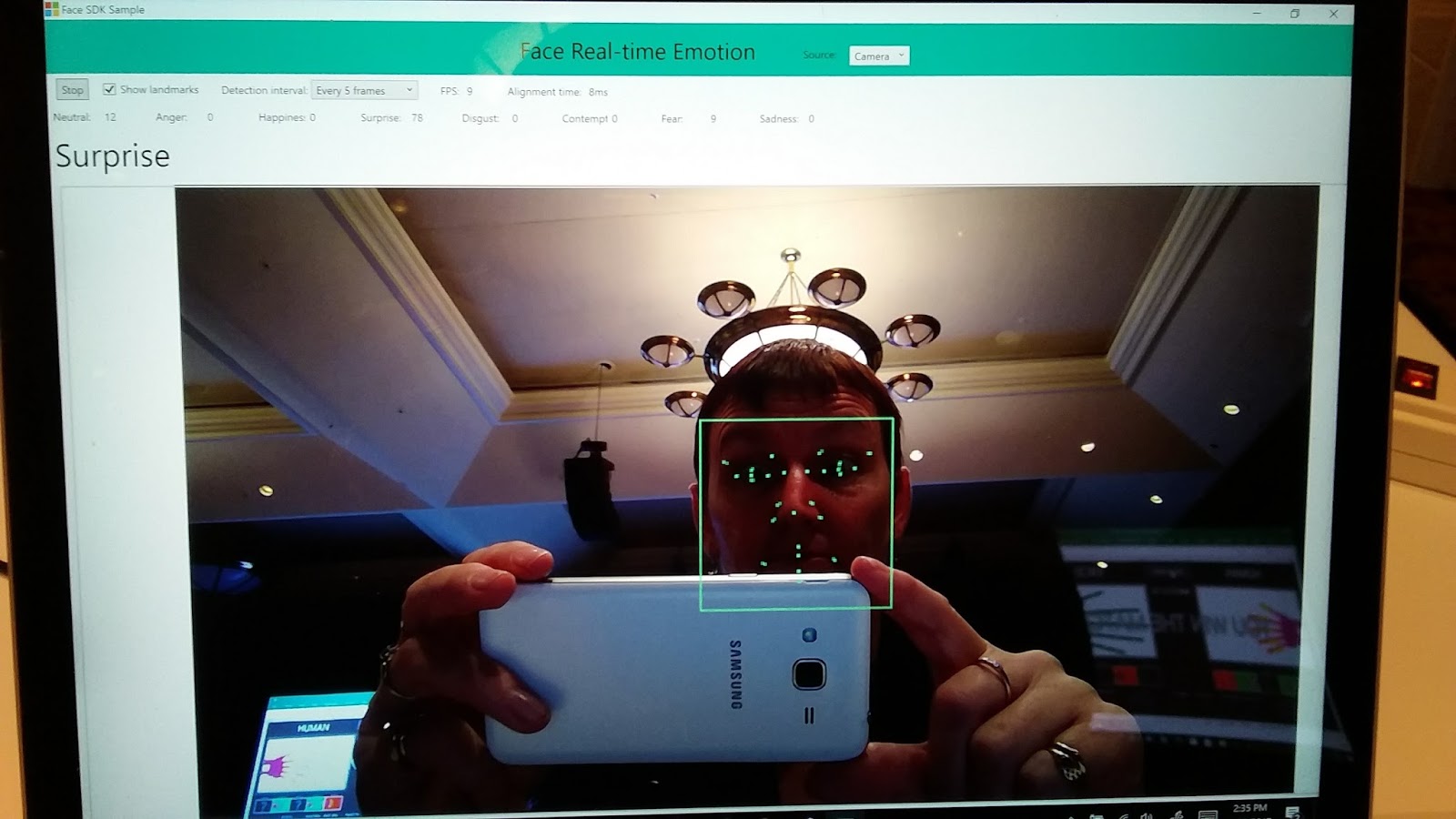
Daniel McDuff, a researcher at Microsoft who spoke at TEDx Berlin, told us about affective computing. This is where technology can understand facial expressions and read student emotions. This can help educators gain an understanding of student experiences via moment-to-moment tracking of cognitive and emotional states. Typically we interact through keyboards but great experiences are multi sensory and multi modal. Capturing information about memory, decision making, communication, and wellbeing is important. Faces convey the experience people are having and they are working on automatically coding this info. Look at a face, analyse and interpret. They look at gestures, the physiology, facial coding acknowledging  as well that it is important to understand context and who the computer is working with. This software means they can tell if facial expressions change so you can tell if the work is boring, exciting or if the student is happy or sad.
It gives the ability to provide people who teach remotely the feedback of how people are taking the information if they switch on their webcam to capture responses during content delivery. This means teachers can make changes as they teach if the student is puzzled or confused. It could also help with the flipped classroom, as you can tell if students have got it and can move ahead. Also, you could pick up anxiety about it. This also means that it can capture aspects of your emotions and tailor the experience for you. They have been working with Hololens to visualize information in real time and I managed to see this in action later in the day. Another thought I had was around students with difficulty reading expression, where one day they could maybe have some glasses that can help read other peoples emotions.
Mike Tholfsen (aka Mr OneNote) then spoke about his top 10 tips for OneNote. His presentation is here.
OneNote is free on every device and every platform and is an amazing programme saving time, helping with organisation and collaboration. I am a big OneNote fan and they just keeping improving it all the time. These were his top 10 things he likes:

1:  Class notebook - class notebook works with a range of LMS around the world so that grades can be put straight in.
2:  Added stickers for teachers to use
3:  You can embed cool things such as geogebra, quizlet, soundcloud, sway
4:  A quick hack. How to quickly make pages – make a table, right click and choose “link to page” and it will automatically make pages for each name in list
5:  Staff notebook – they have a vision for Professional Learning Criteria in this. They have also created help for your Professional Learning Community (PLC). It is in the waffle. If you go to New Group in office 365, create group and choose PLC group you get a notebook with templates.
6:  Export class notebook – really handy when you want to save a copy - right click in your list of notebooks and “save a copy”.
7:  Learning Tools are now built into the online version, also free with word online. Love the Learning Tools!
8: Windows 10 version of OneNote has rainbow ink, fun with ink and reversible ink where you can playback the order of what they did. It’s called Replay when you are looking for it.
9:  Ink to Math – this is great and can even generate graphs automatically.
10:  Writing prompts – this is brand new out this week – aka.ms/writeideas – A great tool for students wanting ideas for their writing.

Some other great things about OneNote (I could go on forever):
- students self-assessing with templates in one note
- give feedback and give support from parent educator like a teacher aid. Don't have to sit next to them if they get embarrassed by that, they can work on the same book at the same time
- Giving feedback by video


What a session – only 2 hours into the day and we were filled with ideas and possibilities. I loved that this was streamed live so other educators around the world could drop in on a part of #E2. Hopefully this will inspire them to be the best they can be and maybe be a part of the Microsoft Innovative Educator network.