Showing posts with label Sustainable Development Goals (SDG). Show all posts

Sunday, 15 July 2018

NZ MIE Expert Hui 2018 notes Day 2

My notes from Day 2 - great weekend with amazing educators.

Session 1 (via Skype) Sustainable Development Goals - Koen Timmers


Top 10 global teacher prize
Looking for things across cultures that make us all the same
Formal education focuses too much on knowledge
Lack of interaction. Need soft skills
Longer you go to school, the less creativity
"Teaching is neither necessary nor sufficient to produce learning" Jean Lave
Don't need a teacher to learn, we can learn by doing
Every child in UK gets a micro:bit
Students learn from each other. Collaborative learning important
Flipped learning by making tutorials and screen cast
Different ages, topics and schools have different needs
"A teacher is a pedagogical engineer who needs to apply the best learning approach to a specific situation."
Climate change and refugees. People getting fed up reading about these.
Kakuma refugee camp in Kenya
Skype lessons. Sent his own laptop to the camp and raised money and got solar panels and more laptops.
Free education by digital means. Not just subjects but connecting them with the opportunity to talk about culture, sport.
So much harder to send own laptop to camp than finding educators to do it for free.
SDGs while in India. Made by UN to make the world a better place.
Launched global education project
#teachsdgs - follow this
Create one video each week that was published each week, then learnt from other children. Used Skype.

Trips, got parents to change at home too
Project based, they choose what they were to learn that day.
Even without devices they could do. Made songs, danced.
More engaged when created own content
Real life learning
Learn global issues from students living in those areas
Use of Skype really important. Lots of Skype calls with experts, for example Celine Cousteau
Technology enhanced learning
Meaningful data
Use green screen to put them in new situations
VR units for same thing, google cardboard
Lego can be used to make stop motion videos
Lifeliqe holo lens free app offers 3d models
Malawi -  grow plants with 90% less water project
Meal worms can eat plastic
They learn a lot from each country when watching the videos

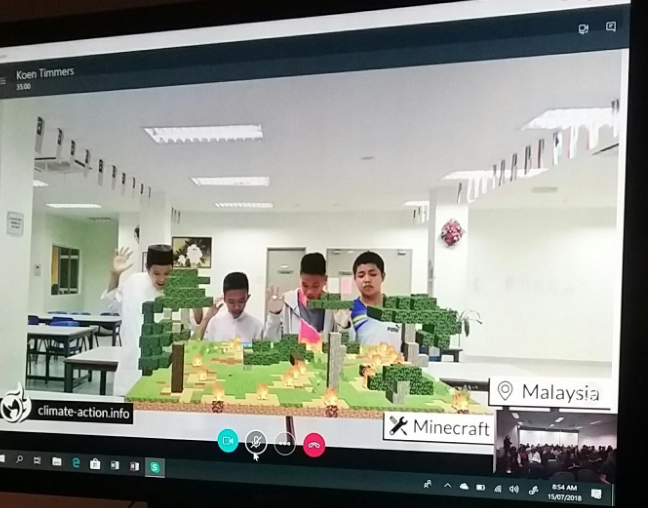
Minecraft in conjunction with free Windows virtual reality app
50 different countries collaborated on eco friendly world climate action project
Students need to move from learning to taking action.
Create mural
Need educators to take part
Sdg projects - Teachers need to exchange ideas
New exciting Innovation coming up that we can't say yet - but won't be far away - we got told and it's really exciting!!!
What can we do for change?
Join http://www.innovationlabs.com/ to get involved in new curriculum
Join project Kakuma
Make own project
More about shifting approach of learning. Focus on learning not on teaching.

Session 2 - Social Media for Educators - Pip Cleaves

Got to be careful online - some real blunders by others - check #hasjustinelandedyet
More than 50%of us use Social Media for teaching
Facebook, YouTube, Blogging, Medium, LinkedIn, Twitter, Instagram, Trip Advisor, Yelp, Snapchat, Tinder, Pinterest
30% use it to communicate with students
Defines who you are online. What is your brand? How am I going to appear online?

Highlight your expertise.
Make a nice header
Increases your credibility
Creates a more rounded image of you
Gives you another way to build relationships
Who are you?
How do you want to be perceived?
How will you leverage your expertise to build your reputation?
What are you going to talk about focus on content and conversation that adds value
Why are you participating in social media? What goals are you trying to achieve?
Where will you participate? Which networks?
How will you use Social Media to shape your brand?
@cpaterso Cameron - has twitter account for yr 9 history class
Posing questions to the world

Don't use it to vent
If your grandmother doesn't want to see it, it is probably not best to have it there.
LinkedIn current photo, areas of expertise.
If you are just getting started: read, like, retweet without comment, then with comment, then chat
Internal Yammer Set up profile within that space first
Newspaper Test - How would I feel if this ended up on the front page of the newspaper?
Whenever she friends someone on fb, check privacy settings and check after updates

Where to go to find good stuff?
Twitter chats
Medium, can follow topics, write blogs on phone
Feedly
Pinterest
Primarystemchat
Tweet meet for #MSFTEduchat18 July about flip grid
Once in a hash tag you can get more sites to look at
Pinterest
Stemsharensw
Steph Westwood
Tweetdeck
Tools for keeping info you get:
One Note
Pinterest
OneDrive - can save links
Twitter Bookmarks

Pip then challenged us to turn ideas into action, by sharing, tweeting and following others.

There were then a range of sessions that we could choose from that were presented by MIE Experts form around the country and overseas. These are the ones I chose:

MIE Session 1 - Virtual Chemistry - Dr Michael Harvey

Realism - new app coming
Gamified 3d  science education platform
Wanted a NZ voice and now have 4alpha testers
Working on how to fit the app into the nz curriculum
Can't afford these things so have a virtual lab
Rocket lab, chemistry and can construct solid fuel rockets
Chem 2.1 and internal
Solution labs
Combining chemicals, more yr 9 and 10
Can see effects in real time
Titration lab
Access to acid and base solutions
Useful to do before a physical titration at school
Alkali metal simulation
Calorimetry lab
Visualisation
Classic Styrofoam cup

Once it is completed, is it for purchase? Not sure how it will roll out.
Can jump on board as beta testing

Minecraft could do some of that at middle school level.
Future would be fireworks lab with exciting electrons of various metals
2 sections, chemistry and rockets
Doing it theoretically in the computer first before doing in the lab.
Gamified with levels and questions, could do as a flipped classroom
Can see student scores in questions
Front end loaded with some content
Set a goal for the experiment and have a learning objective

We launched a rocket which was fun

MIE session 2 - Digital Tech - Carmen Kenton


Digital part of the nz curriculum that was reviewed.
Start off 2020
Focus now on teacher competence. 18 months to get our heads around the new digital curriculum
Differences between Hangarau matihiko and Digital technologies within the nz curriculum
Not the same
Exercise to do:
Carmen gave us a two sided paper. One side process outcomes for computational thinking, other side designing and developing digital outcomes
Which curriculum learning areas does the activity support?
Which progress outcomes best fits the activity?
Collecting pollen
Dance moves
Scavenger hunt
Kapa haka website
All from technology online website
She gave us lots of links to the Digital Tech curriculum

I presented a session on Learning at Haeata (and got an wonderful MIE backpack for doing it), then went to the last presenter session of the day.

MIE session 4 - Digital devices improving pedagogy and student writing performance - Ryan Higgins

Digital devices improving pedagogy and student writing performance
Using one note 2016 changing soon to online version
Little things working well
Modelling books, doing this digitally so people can keep using
Data is huge for change
Pd with external advisors - good to get another voice
Brainstorming ideas - ideas they are trialling in a one note
Broken down into : Use of tech. Engaging with pd. Teaching as inquiry. Modelling. Moderation. Home /school partnership
Inquiry ideas : Exemplars, Tech, Scaffolding vs writing, Analysis, Discussing ideas,Assessment
Using SOLO taxonomy
Knew where they were at before report came out
Used TKI exemplars for writing and students didn't like it so came up with they own.
Best form of exemplars come from students
One note notebook, Cloud storage and linked into teams
IPads used qr code for link on one drive
Making everything a sustainable system

Collaborative Project

The afternoon was given to working together on a Collaborative Project. They put us into groups of 3-4 and gave us this task:
Design a learning activity that: 
  • uses a single component of the ‘Computational Thinking Model’  
  • applies this component to one ‘Sustainable Development Goal’ 
  • produce a learning activity using the template in your Collaborative OneNote. 
  • Record a 90 sec video describing your learning activity idea.  

Our group used the following:
Computational Thinking and Sustainable Development Focus Area 
Computational Thinking Component: Decomposition
Sustainable Development Goal: Biodiversity
Specific Sustainable Development Specific Goal 
Take urgent action to end poaching and trafficking of protected species of flora and fauna (animals) and address both demand and supply of illegal wildlife products 

We designed some activities and shared these with the group, including a very entertaining Flipgrid video!
It was a fantastic weekend. I came away with some great ideas and a lot more knowledge especially around Computational Thinking and the Sustainability Development Goals.


NZ MIE Expert Hui 2018 notes Day 1

The Microsoft Innovative Educator Expert hui was held in Auckland at the Microsoft Offices over this weekend. It was really great to catch up with this bunch of amazing educators during the weekend. There were a lot of choices for breakout sessions and I only wish I could have gone to so many more! Here are my notes from Day 1 - with the promise of another blog to follow!

In the introduction session I was excited to hear about getting some ideas together for Māori Mincecraft lessons - this would be amazing and super keen to hear more about this as time goes on.

Session 1 - Computational Thinking - Becky Keene @BeckyKeene Director insight2execution

1 to 1 institute
For soft skills, four cs
Collaboration, communication, creativity, critical thinking, computational thinking.
For some reason we pigeon hole comp thinking into math and science
Becky then got us to commit to teach computational thinking to our students
The core gets missed
Why is this important for our students for life?
Ubiquitous computing - Computing is everywhere and anywhere. It's pervasive - pacemakers, phones, hearing aids
Taking tasks that are boring and delegated to computers. We don't even think about it any more.

Industrial revolution. Took the labour market and put it to machines
If we only use tech in mind then we are slaves to that. We need to change that. Not just about efficiency and menial tasks.
Music box first example of computing. Wasn't designed for efficiency, designed for joy and art.
Need AI and quantum to solve issues

We need to push student thinking beyond what they know. We want to make this world a better place.

R2D2 and BB8 seem to think, but have been programmed. Attractive because we have taken robots and added a layer of humanity.
Gives students a pathway to help solve problems. Layers in a human element that can be missing in computational thinking.
Conceptualising not programming. It's about big concepts. Understanding problems, decision making and problem solving
Fundamental not rote
Critical for functioning in society.
Ideas not products.
Schools have been about students consuming and producing. We have to start thinking about valuing ideas not products

The computer science major can take on any job as they have the skills in computational thinking

Trans disciplinary across all of these things. It applies to all subjects, even learning to read fits
Computational Thinking is a problem solving process

4 universal components: (Spolier alert - the answers to the puzzles on the right are in the notes!)

Abstraction
Identify what defines the pattern you see and focus on the important info. Extract unnecessary info - dog and cedar not important in this puzzle.
Students get so wrapped up in things that don't matter. Learn to spend time where it matters


Algorithmic thinking
When you follow a step by step pattern
Game that does riddles like this
Answer: In which direction do you live?

Decomposition
Ability to break out down into smaller parts. Eg jigsaw

Pattern recognition
When you observe similarities and patterns within problems
13112221
Read out loud the line above:One 3 one 1 two 2s and two 1s
Plant experiment. Relevant to life and pattern recognition. 
Growing veges and the pattern you have been doing each year

Go out to community and find out what app is needed,  write an algorithm to solve this.

What is the change you can take when you take ct and add a human development.
Skype can make things face to face. 


"In order to accelerate our innovation, we must rediscover our soul" Satya Nadella


Session 2: Digital Tech Curriculum - Iain Cook-Bonney @iaincb and Chris Dillon @onemouse

As a young child he played cosmic fighter game. Pages of code in magazines to type in. At young age would be debugging and problem solving.
Had an apple iMac in classroom when first started teaching.
Collaboration needed because of only one computer.
Chris talking about STEM online for new digi tech curriculum and new DT and HM online
Looking at future lives for jobs and perusing and environment that we don't know what it will look like.
Digital Tech shortage especially girls and Māori and Pasifika

Prediction that approx 55% of NZ GDP will be derived from digital products or services by 2021, currently about 6%
Big impact on new career paths and it is coming quicker than we think
SDGs - How do these fit into our schools vision and dispositions?
11 digital curriculum, could be more
The curriculum is different from "teaching with" digital tech. Not using devices and apps.

An article I found on teaching SDGs and am now following Koen Timmers around this as well.
Digital Tech Curriculum:

Doesn't mean you do it in that order. Some students may take years to progress. Allows for range of personal.
Progress outcomes rather than achievement outcomes.
May go quickly through them
CS unplugged website
Kidbot fitness
Expectation of digital tech that every student can write a program by end of year 10.
This is cross curriculum. Integrate into huge range of areas.
Some of the least capable people  in the new digital tech curriculum are the principals.

They should have capability to help lead the new curriculum, they need to be up skilled.
Reviews of ncea and digital tech people talking ? 
Kia Takatū ā-Matihiko national training programme.
Self review, toolkits, community to share ideas
Digital leader, can be a Pouahi. Will get a separate online course.

Session 3: XcerioDigital Skills Institute - Jonathon Jansen

Microsoft office specialist competition. Was a student of that
Industry certification. Desktop level apps
Ms tech certification
Build trust between employer and students.
Asking for IT certification
MS office specialist or specialise in Security, can give them accreditation in those.
I have a Microsoft endorsement in this area.
Way or means for student to stand out. All have ncea L3 but have this to prove their skills.
Microsoft certified educator exam
21c learning goals. New version
Imagine academy is also free.


Immersion Session 1 - 3d Paint - Donna Golightly


If we don't know why we are using anything, then the outcome is not the best it can be
Why would we use it?
It supports design thinking strategy
Promotes future ready skills
Supports new digi tech
Engaging
Can use as 3D print - real world application
Supports the 6 Cs - incorporates, Character and Citizenship

Can use the scaffolds or go straight in
Can create a sticker - cut themselves out, then chose a cc photo in the world and put themselves in it - wrote about it. Need that image on your device
Have control of what gets cut out
Stickers can be used in 2D or 3D - will wrap around 3D images
Can save as 3d model, image or video
Mixed reality viewer - what ever your camera can see is what the image goes in from of and can take photos or videos
3D model - can import into PowerPoint or Word or OneNote
Paint 3d in the classroom - scaling for maths

Do everything a Chromebook does but can do more with new Surface Go - as long as it runs Windows 10

Immersion Session 2  Digital Custodians - Pip Cleaves

Apps to install on phone:

Indigital storytelling:
Philanthropy side of MS wanted to connect them with their community
Made 5 stories in this project
Low cost - working with Dept of Ed to roll out
Ngulgang digital custodians project
Language as well as English

Storyboard in Powerpoint
Indigenous drawing for the card
Assignments in Teams and Sway for learning journey
3d paint courses - https://www.lynda.com/
Saving - can save as 3D printer file
Can paint the white models later
Nice that Paint3d is not perfect. Great to teach grit

Search for Metaverse usage for school
360 video or photo puts a ball into the screen and you step into it
Can put a YouTube video link in - upload your videos to YouTUbe
Go into Minecraft to practice filming

Metaverse runs on Chromebooks
Take laptop out and film in situ
Character in front of green screen

Session 3 - 3.30 Electronics in cross curricular learning - Chris Dillon @onemouse


Working with fabric tech. Coding embroidery. How to integrate electronic outcomes into wearables.
Performance with drama, uses with art
Art sculpture at level 3 filled with lights and reactive with motion
Issue is shortage of specialists within schools.
Electronics seems hard but easier than the physics
Fits into DDDO strand, real life outcomes
Also into control of environments
Social science traffic flows
DDDO, systems, how they work and how humans interact, then how they control those systems

Responsive panels and murals into environments
Through online bulk buying, can put one in front of a student for $1.30. Give them to every yr 9
Leds buy in 1000s
Software is free. Works well. Has limited graphics but a lot of others can use it
Can also use Micro:bit
Need right driver for each board
Other online options for buying resources: Gearbest, Ali express

Coding blocks to test, model and prototype
Started as 3d modelling but can use as online environment - linked into arduino
Circuits, lots of objects and connecting components
Can then code it to do the control. Uses blocky.
As you drag components in it gives you a seed of code
Can be learning about things but without the words of blowing physical things up
Scenario as evidence for Ncea can use snapshots into a one note
Circuit diagrams in a different environment
Seed diagram to decode them develop their own
Under there is a tutorial tab. Traffic light
In school garden developing devices for soil testing
Take off components and modules. Temperature sensors. A few cents a piece.
Batteries, rechargeable power pack made out of laptops old batteries. 

Mini greenhouse
Tki task building a greenhouse for windowsill
Temperature control, moisture unit
Detects when soil to dry, then pump water
Proposal pitch, design pitch,. Electronic environment for a years work. DT outcome in physics

Microbit
Moisture detection probe
Cheap ones corrode
3d print a case for it. DDDO outcome
User magazine for micro:bit launched yesterday


Looking forward to Day 2!