Showing posts with label Microsoft. Show all posts

Sunday, 15 July 2018

NZ MIE Expert Hui 2018 notes Day 1

The Microsoft Innovative Educator Expert hui was held in Auckland at the Microsoft Offices over this weekend. It was really great to catch up with this bunch of amazing educators during the weekend. There were a lot of choices for breakout sessions and I only wish I could have gone to so many more! Here are my notes from Day 1 - with the promise of another blog to follow!

In the introduction session I was excited to hear about getting some ideas together for Māori Mincecraft lessons - this would be amazing and super keen to hear more about this as time goes on.

Session 1 - Computational Thinking - Becky Keene @BeckyKeene Director insight2execution

1 to 1 institute
For soft skills, four cs
Collaboration, communication, creativity, critical thinking, computational thinking.
For some reason we pigeon hole comp thinking into math and science
Becky then got us to commit to teach computational thinking to our students
The core gets missed
Why is this important for our students for life?
Ubiquitous computing - Computing is everywhere and anywhere. It's pervasive - pacemakers, phones, hearing aids
Taking tasks that are boring and delegated to computers. We don't even think about it any more.

Industrial revolution. Took the labour market and put it to machines
If we only use tech in mind then we are slaves to that. We need to change that. Not just about efficiency and menial tasks.
Music box first example of computing. Wasn't designed for efficiency, designed for joy and art.
Need AI and quantum to solve issues

We need to push student thinking beyond what they know. We want to make this world a better place.

R2D2 and BB8 seem to think, but have been programmed. Attractive because we have taken robots and added a layer of humanity.
Gives students a pathway to help solve problems. Layers in a human element that can be missing in computational thinking.
Conceptualising not programming. It's about big concepts. Understanding problems, decision making and problem solving
Fundamental not rote
Critical for functioning in society.
Ideas not products.
Schools have been about students consuming and producing. We have to start thinking about valuing ideas not products

The computer science major can take on any job as they have the skills in computational thinking

Trans disciplinary across all of these things. It applies to all subjects, even learning to read fits
Computational Thinking is a problem solving process

4 universal components: (Spolier alert - the answers to the puzzles on the right are in the notes!)

Abstraction
Identify what defines the pattern you see and focus on the important info. Extract unnecessary info - dog and cedar not important in this puzzle.
Students get so wrapped up in things that don't matter. Learn to spend time where it matters


Algorithmic thinking
When you follow a step by step pattern
Game that does riddles like this
Answer: In which direction do you live?

Decomposition
Ability to break out down into smaller parts. Eg jigsaw

Pattern recognition
When you observe similarities and patterns within problems
13112221
Read out loud the line above:One 3 one 1 two 2s and two 1s
Plant experiment. Relevant to life and pattern recognition. 
Growing veges and the pattern you have been doing each year

Go out to community and find out what app is needed,  write an algorithm to solve this.

What is the change you can take when you take ct and add a human development.
Skype can make things face to face. 


"In order to accelerate our innovation, we must rediscover our soul" Satya Nadella


Session 2: Digital Tech Curriculum - Iain Cook-Bonney @iaincb and Chris Dillon @onemouse

As a young child he played cosmic fighter game. Pages of code in magazines to type in. At young age would be debugging and problem solving.
Had an apple iMac in classroom when first started teaching.
Collaboration needed because of only one computer.
Chris talking about STEM online for new digi tech curriculum and new DT and HM online
Looking at future lives for jobs and perusing and environment that we don't know what it will look like.
Digital Tech shortage especially girls and Māori and Pasifika

Prediction that approx 55% of NZ GDP will be derived from digital products or services by 2021, currently about 6%
Big impact on new career paths and it is coming quicker than we think
SDGs - How do these fit into our schools vision and dispositions?
11 digital curriculum, could be more
The curriculum is different from "teaching with" digital tech. Not using devices and apps.

An article I found on teaching SDGs and am now following Koen Timmers around this as well.
Digital Tech Curriculum:

Doesn't mean you do it in that order. Some students may take years to progress. Allows for range of personal.
Progress outcomes rather than achievement outcomes.
May go quickly through them
CS unplugged website
Kidbot fitness
Expectation of digital tech that every student can write a program by end of year 10.
This is cross curriculum. Integrate into huge range of areas.
Some of the least capable people  in the new digital tech curriculum are the principals.

They should have capability to help lead the new curriculum, they need to be up skilled.
Reviews of ncea and digital tech people talking ? 
Kia Takatū ā-Matihiko national training programme.
Self review, toolkits, community to share ideas
Digital leader, can be a Pouahi. Will get a separate online course.

Session 3: XcerioDigital Skills Institute - Jonathon Jansen

Microsoft office specialist competition. Was a student of that
Industry certification. Desktop level apps
Ms tech certification
Build trust between employer and students.
Asking for IT certification
MS office specialist or specialise in Security, can give them accreditation in those.
I have a Microsoft endorsement in this area.
Way or means for student to stand out. All have ncea L3 but have this to prove their skills.
Microsoft certified educator exam
21c learning goals. New version
Imagine academy is also free.


Immersion Session 1 - 3d Paint - Donna Golightly


If we don't know why we are using anything, then the outcome is not the best it can be
Why would we use it?
It supports design thinking strategy
Promotes future ready skills
Supports new digi tech
Engaging
Can use as 3D print - real world application
Supports the 6 Cs - incorporates, Character and Citizenship

Can use the scaffolds or go straight in
Can create a sticker - cut themselves out, then chose a cc photo in the world and put themselves in it - wrote about it. Need that image on your device
Have control of what gets cut out
Stickers can be used in 2D or 3D - will wrap around 3D images
Can save as 3d model, image or video
Mixed reality viewer - what ever your camera can see is what the image goes in from of and can take photos or videos
3D model - can import into PowerPoint or Word or OneNote
Paint 3d in the classroom - scaling for maths

Do everything a Chromebook does but can do more with new Surface Go - as long as it runs Windows 10

Immersion Session 2  Digital Custodians - Pip Cleaves

Apps to install on phone:

Indigital storytelling:
Philanthropy side of MS wanted to connect them with their community
Made 5 stories in this project
Low cost - working with Dept of Ed to roll out
Ngulgang digital custodians project
Language as well as English

Storyboard in Powerpoint
Indigenous drawing for the card
Assignments in Teams and Sway for learning journey
3d paint courses - https://www.lynda.com/
Saving - can save as 3D printer file
Can paint the white models later
Nice that Paint3d is not perfect. Great to teach grit

Search for Metaverse usage for school
360 video or photo puts a ball into the screen and you step into it
Can put a YouTube video link in - upload your videos to YouTUbe
Go into Minecraft to practice filming

Metaverse runs on Chromebooks
Take laptop out and film in situ
Character in front of green screen

Session 3 - 3.30 Electronics in cross curricular learning - Chris Dillon @onemouse


Working with fabric tech. Coding embroidery. How to integrate electronic outcomes into wearables.
Performance with drama, uses with art
Art sculpture at level 3 filled with lights and reactive with motion
Issue is shortage of specialists within schools.
Electronics seems hard but easier than the physics
Fits into DDDO strand, real life outcomes
Also into control of environments
Social science traffic flows
DDDO, systems, how they work and how humans interact, then how they control those systems

Responsive panels and murals into environments
Through online bulk buying, can put one in front of a student for $1.30. Give them to every yr 9
Leds buy in 1000s
Software is free. Works well. Has limited graphics but a lot of others can use it
Can also use Micro:bit
Need right driver for each board
Other online options for buying resources: Gearbest, Ali express

Coding blocks to test, model and prototype
Started as 3d modelling but can use as online environment - linked into arduino
Circuits, lots of objects and connecting components
Can then code it to do the control. Uses blocky.
As you drag components in it gives you a seed of code
Can be learning about things but without the words of blowing physical things up
Scenario as evidence for Ncea can use snapshots into a one note
Circuit diagrams in a different environment
Seed diagram to decode them develop their own
Under there is a tutorial tab. Traffic light
In school garden developing devices for soil testing
Take off components and modules. Temperature sensors. A few cents a piece.
Batteries, rechargeable power pack made out of laptops old batteries. 

Mini greenhouse
Tki task building a greenhouse for windowsill
Temperature control, moisture unit
Detects when soil to dry, then pump water
Proposal pitch, design pitch,. Electronic environment for a years work. DT outcome in physics

Microbit
Moisture detection probe
Cheap ones corrode
3d print a case for it. DDDO outcome
User magazine for micro:bit launched yesterday


Looking forward to Day 2!


Monday, 27 March 2017

#E2 Toronto Day 2 Keynote


I was so excited this morning. We arrived in the conference room and our OneNote Avenger capes were on the chairs! I know this sounds odd, but I have wanted one of these capes ever since I saw them a couple of years ago. I am a real OneNote fan and this just made my day!
Yet more notes today from some great sessions.

The Keynote was live around the world this morning and I know there were some crazy kiwis up at 2a.m. to watch it! Anthony Salcito (Vice President of Worldwide Education, Microsoft) was first to speak and he started by talking about there being four Industrial Revolutions, with the fourth being the Digital Revolution and then he related these to four digital ones.
1st revolution of digital tech: Fuelled by passionate pioneers. Brought devices into classrooms and created comp labs. Saw potential in technology.
2nd revolution was fuelled by the first group. Countries saw tech as part of future. Device to each student. Led to lots of disconnect between pedagogy and the classroom.
3rd revolution reassessing what is most important. How do we reduce risk and prepare teachers?
Some schools still in 1st or 2nd revolution stage
How do we fuel student passions? How can we drive better learning outcomes in the classroom?
4th revolution. Making tech invisible in and out of the class. Shifting tech around skills. Think collaboratively, using creativity prepares them to make things real and make an impact.
He likened schooling to travelling on a train, everyone's view is the same. Everyone was going to same stop. The only variable was the grade. Technology enables students to travel any way. Resources are limitless. Time is the variable. Mastery of skills is the progression point.
We need to get students on a personal learning path for their own future.
The role of an innovative educator is to expand their knowledge and embrace the learning of life beyond the classroom. Microsoft is working to lower the price of technology and make it easier to support. They are also keen to push the upper end with devices such as the Surface Studio (I so want one), improving tools for creativity. He says we are on the precipice of real change.
The WE team works on embracing service based learning and how youth can change the world. So far there are over 10,000 schools involved. Students are given tools and inspiration to take action and make a difference. Watch WE are one. There is also a We Are One OneNote to help with this initiative. This looks really interesting and I am certainly going to look into it further to see if Haeata could or should become a WE school. One school that has embraced this is Queen of Heaven Elementary School where their students are working to help improve access to education for young people in developing countries.

Some of the things Microsoft has been working on recently:

Minecraft has been an amazing tool that has been worked on and he mentioned Meenoo Rami’s book called Thrive. See notes on her talk later in this post.

This is a programme that helps support thinking in 3D. There are tools to help with 3D printing and to plug in IED software as well. Looks amazing!

Index Content for search engines
Search engines are natural for kids so they are looking to make this even easier by indexing the content, which you can see some examples of in Bing and it’s use in Word.

Word and cognitive services
They have already improved in this area by adding more features to Ink to Word. The replay feature is great, being able to watch what has been added in order. You can circle text and right clicking will bring up a menu to use with that text. You can also right click a highlighted word and choose smart lookup which is a research tool that embeds Bing into Word. Love this feature! He gave us an example of a document about the Bay of Pigs, highlighted the word pigs which brought up research on the Bay of Pigs rather than the animal. Yet in another document on animals when the word pigs was highlighted, it brought up the animal. Very clever. You can also right click on a word and go to spelling which gives spelling, synonyms, and can read the word aloud.

PowerPoint
They have introduced Quick Starter technology where you can choose a topic such as the solar system and then you choose starter slides from which you can create work to present quickly. References automatically come in as you select pictures or text to import.

There is now a help button that enables you to find the content you want quickly. There are always new courses being put up and lots of lessons that are shared. There is also a Make What's Next badge – the theme of E2.

You can ask questions and get answers from the website right away without having to search.

An open flexible cloud-based platform.

When using video it can often be too large. Need to be able to index content. With this, you can find relevant places in the video, it recognises people so you can search for them and it creates a transcript. You can index key words and it has speech sentiment built in so you can get an idea about how the speaker is feeling. He showed us a video of International women's day 2016 what are you going to make1080 which asked students about famous inventors. They all named males and when asked to name females, the speech sentiment changed. It was really interesting for negative vs positive recognition.
His closing remarks summed up all of this really well:
Change is happening incredibly fast
MeenooRami from Microsoft’s Minecraft team, spoke to us about how educators can motivate, inspire and ignite a passion for learning in every student by using Minecraft. The world that our students inhabit is shifting rapidly and she asked how do we help our students become the leaders and learners in this moment?
She gave examples of some educators using Minecraft in innovative ways:
John Miller inCalifornia. Took folk tales and recreated moments in Minecraft. The students recorded the retelling of the stories on video. Students get to communicate across states.
Katja Borregaard and MikkelMadsen is teaching communication, collaboration and critical thinking in Minecraft.
She said the best educators never stop being learners. They are not afraid to meet what the students are doing. They take passion and turn it into powerful learning.
Steve Isaacs never stops trying new things. He turned Rapunzel into a quest. Minecraft a tool to allow students to show their thinking and their imagination. We learn best when we learn in communities and people around us push us to be better.
Minecraft is great for trying to solve a problem. Students place blocks and break blocks in a visual way to solve problems. This immersive 3D world creates a buzz with students sharing and learning.
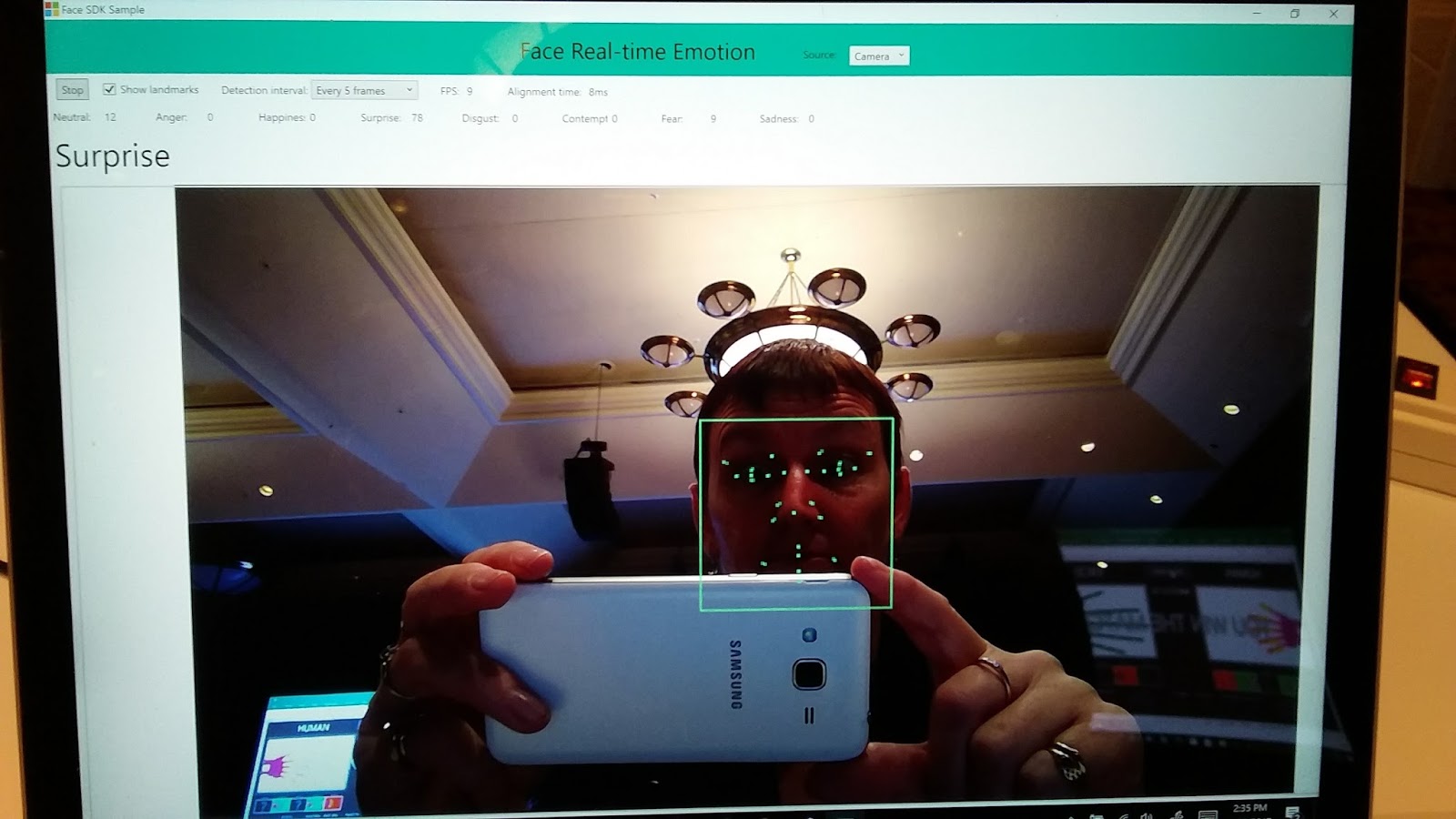
Daniel McDuff, a researcher at Microsoft who spoke at TEDx Berlin, told us about affective computing. This is where technology can understand facial expressions and read student emotions. This can help educators gain an understanding of student experiences via moment-to-moment tracking of cognitive and emotional states. Typically we interact through keyboards but great experiences are multi sensory and multi modal. Capturing information about memory, decision making, communication, and wellbeing is important. Faces convey the experience people are having and they are working on automatically coding this info. Look at a face, analyse and interpret. They look at gestures, the physiology, facial coding acknowledging  as well that it is important to understand context and who the computer is working with. This software means they can tell if facial expressions change so you can tell if the work is boring, exciting or if the student is happy or sad.
It gives the ability to provide people who teach remotely the feedback of how people are taking the information if they switch on their webcam to capture responses during content delivery. This means teachers can make changes as they teach if the student is puzzled or confused. It could also help with the flipped classroom, as you can tell if students have got it and can move ahead. Also, you could pick up anxiety about it. This also means that it can capture aspects of your emotions and tailor the experience for you. They have been working with Hololens to visualize information in real time and I managed to see this in action later in the day. Another thought I had was around students with difficulty reading expression, where one day they could maybe have some glasses that can help read other peoples emotions.
Mike Tholfsen (aka Mr OneNote) then spoke about his top 10 tips for OneNote. His presentation is here.
OneNote is free on every device and every platform and is an amazing programme saving time, helping with organisation and collaboration. I am a big OneNote fan and they just keeping improving it all the time. These were his top 10 things he likes:

1:  Class notebook - class notebook works with a range of LMS around the world so that grades can be put straight in.
2:  Added stickers for teachers to use
3:  You can embed cool things such as geogebra, quizlet, soundcloud, sway
4:  A quick hack. How to quickly make pages – make a table, right click and choose “link to page” and it will automatically make pages for each name in list
5:  Staff notebook – they have a vision for Professional Learning Criteria in this. They have also created help for your Professional Learning Community (PLC). It is in the waffle. If you go to New Group in office 365, create group and choose PLC group you get a notebook with templates.
6:  Export class notebook – really handy when you want to save a copy - right click in your list of notebooks and “save a copy”.
7:  Learning Tools are now built into the online version, also free with word online. Love the Learning Tools!
8: Windows 10 version of OneNote has rainbow ink, fun with ink and reversible ink where you can playback the order of what they did. It’s called Replay when you are looking for it.
9:  Ink to Math – this is great and can even generate graphs automatically.
10:  Writing prompts – this is brand new out this week – aka.ms/writeideas – A great tool for students wanting ideas for their writing.

Some other great things about OneNote (I could go on forever):
- students self-assessing with templates in one note
- give feedback and give support from parent educator like a teacher aid. Don't have to sit next to them if they get embarrassed by that, they can work on the same book at the same time
- Giving feedback by video


What a session – only 2 hours into the day and we were filled with ideas and possibilities. I loved that this was streamed live so other educators around the world could drop in on a part of #E2. Hopefully this will inspire them to be the best they can be and maybe be a part of the Microsoft Innovative Educator network.


Wednesday, 4 May 2016

Surface Pro 4

I've been waiting...

Ever since I found out I had been selected to be a Microsoft Innovative Educator Surface Expert, I have been very excited about getting a Surface Pro 4 to play with.

It arrived today.
I had primed our wonderful receptionist to let me know as soon as it arrived at school and she called me at lunchtime today. So excited!

Luckily I had some time this afternoon to unpack the amazing box of goodies. Not only was there my new Surface Pro 4 and stylus, but a whole lot of extras:
A useful "how to use your kit" instruction sheet - I'll be working through this!
  • Digital inking display board
  • Brochures, posters and information sheets on the Surface Pro, as well as Think in Ink stickers. The posters also let you advertise workshops for Surface Pro.
  • A lovely sticker for my Surface that says I am an MIE Surface Expert for 2016 - very nice :)
  • Wireless Display Adapter - already using one of these, so it will be great to have another in my second classroom - save moving it from one place to another all the time! (Now all I need is another in my 3rd classroom and I'm all sorted).
  • USB bracelet - great idea, unfortunately it's a bit big for me - It slips on and off my hand without undoing it, so maybe it will be on my desk not my wrist :( Need small wrist size ones as this is unfortunately not adjustable)
  • A nice bright red keyboard - might take me a bit to get used to the colour but it's kind of cool.
  • A Brenthaven BX2 Edge case. I tried attaching the pen by the string they sent but decided against it, but good to have that option, especially for students who lose things! I notice that this case is not available on the NZ Microsoft store yet, so it's fun to trial something you can't get here! My only comment at the moment is that the pen is on the wrong side! I have to take it off with my left hand - great for the left-handers out there though.

So... I managed to get some of my school accounts sorted - got Office365 up and running, downloading the awesome free software onto my Surface Pro 4 so I can do work while offline - this is a real bonus. The one thing I noticed in even in the first few minutes of use, was the keyboard, trackpad and stylus were a lot better than the Surface Pro 3. Really looking forward to using this.

Managed to lock myself out while trying to get my kids to see if Windows Hello would recognise their faces instead of mine! Took a fair bit of stress sorting that out as it kept asking for my PIN but had no way of entering it. Finally I pressed the Power and the up volume together - with the intention of doing a forced shutdown, but as soon as I touched both a screen appeared for me to put my PIN in - whew!

Next steps are to get used to the new stylus - I'm not sure about having the eraser at the top, I'll have to see how that goes.

Must install my OneNote Learning Tools and Staffpad tonight and hopefully get the rest up and running tomorrow.

I am also going to invest in a Bluetooth mouse - I find a mouse useful in a lot of situations, but don't want to lose the USB port. Thinking about adding more memory via card as well - will wait and see what I need once I am all set to go. Most of my work is online, but video and audio files for my music teaching takes a lot of space.

Lots to do - more blogging will have to wait.

Monday, 8 February 2016

Beginning of 2016


I'm excited. After becoming a Microsoft Innovative Educator Expert last year, I have now been given the title of MIE Surface Expert. I love my Surface Pro 3 and am even more excited to be getting a SurfacePro 4 as part of this programme. Looking forward to it!
Thanks to Kurt Soeser for providing the header - it is much appreciated and looks great!

The beginning of the year has been mad. I have been meaning to blog for ages, but all of the setting up and prep has meant that I have had little time to just sit and write.

Enrolment
We have 2 days of enrolling new students at our school and I really enjoy these days as an enroller. I get to meet new students and work on getting a good programme together for them.

School of Apps
We have 11 students this year and they have started the year well. Very keen and motivated, and even with all the admin in the first few days, they are writing apps already. I am also loving the OneNote Learning Tools. These are fantastic for a few of my students in here. One has some sight issues so the large print is fantastic and a couple are dyslexic. How amazing to be able to cater for them with such great tools.

Professional Development
I am really keen to help staff this year and have set up sessions to instruct and support staff on a range of topics. Carmen Kenton and Andy Gorton are great support in this and Carmen and I will enjoy our lunchtime duty in the Computer lab where we can help staff and students. For my own development I intend to spend quite a few hours each week working on increasing my knowledge of Office365 and in particular OneNote.

Year 11 Music
I am looking forward to teaching this class, as it has been a while since I had this year level. Using OneNote for all their work and looking at how I can incorporate a lot of technology in the class is the challenge. It is a large class and has a wide range of abilities. I am keen to use StaffPad for all the music notation instruction so I have work to do on this as well.

Badges
Really keen to get these up and running. Just sorting the graphics and we can get started. It will be good to get them out to students this year and see how they will work.

Along with organising Itinerant Music lessons, School of Music classes, MIE Expert info and reading, keeping up with Twitter, and my own life/work balance it will be a busy year.

Bring it on.


Thursday, 3 December 2015

MIE Expert first connection call

Wow - what a buzz. An amazing, inspiring hour from awesome presenters and lots of great ideas and motivation.
I thought I would put a few of the links and ideas here for any #MIEexperts - I am a visual learner so really like things written down!!!
 Some things are specific to MIE Experts (I have put these at the bottom) but a lot are useful for everyone. If you are not signed up at the Microsoft Educator site - you should be! Go there now.
There are some amazing opportunities for anyone to have free online Professional Development.

Check out these educasts. They will be on demand if you can't attend at the time.


If you want to be creative and learn how to use technology to disrupt a boring classroom environment by putting learning in the hands of the students then you need to check out the #hacktheclassroom event.


Get involved in the Skypeathon on Dec 3 and Dec 4 - a great way to be connected.
Even those who are on holiday can participate as guest speakers.

I really enjoyed the session with Rafranz Davis (@rafranzdavis) who is an MIE expertwith great ideas about "Building your brand".
Her advice:
  • Your twitter handle should be your name – own it.
  • She suggests getting a domain name of your own – when someone wants to know who you are, who is better to tell them but yourself.
  • Search yourself – important you know what is being said and what is out there.
  • Check out Rafranz's book "The Missing Voices in EdTech:Bringing Diversity into EdTech".
  • Follow people outside education, follow people who are inspiring. Follow professionals in other fields.
  • Share the work of others. When you read a blog post share it and attribute it.
  • Contribute – teachers feel like what they have to say is not good enough. If you have an idea, share it – it will be new to someone. It is valuable because it came from you 
  • Use tweetdeck
  • People she suggests to follow: #MIEexpert of course!!#IStedepln
    #Hourofcode
    @TechChef4u
    @reginaschaffer
    @alicekeeler
  • Best platform for starting a blog: Wordpress, Medium is a good platform, has a built in network and can immediately share with twitter. Weebly – students can get free accounts – get a group of people to share codes, you can get credits.
  • Tweet hint – read the tweets of those before you follow them
My personal view is that I like Blogger purely because I started on it when writing a blog for school - but you need a Google account for it. I love using Weebly for websites though and many of my students have found it really easy.

Some notes specific to MIE Experts:
Twitter for Sonja Delafosse https://twitter.com/sdelafosse
Social Chorus: Minnia Feng https://twitter.com/minniafeng
Email her at mifeng@microsoft.com if you'd like to be featured in Daily Edventures!
Social media 101 sway with info in it that we heard today.


It takes 24hrs to have the Expert badge show up.

New educator community – help to merge partners in learning network with new community
Help button – orange one at bottom will do a work ticket to change emails over etc.

MIE experts should use the #MIEExpert and the #MSFTEdu hashtag

Do local regional face to face meetings with other MIE experts.
March 9 – livestream Budapest conference

Use Teachmeet to empower educators around you. How are you building a community of teachers in your area to make them amazing?

The hour went so quickly - I am just pleased I managed to get some notes and ideas down so I could reflect on them again. I am really looking forward to engaging with everything and everyone.