Showing posts with label #OneNote. Show all posts

Tuesday, 2 May 2017

Holiday thoughts

Time to recharge the batteries

Often we hear people talk about the amount of holidays teachers get. I certainly needed mine this time around. A new school, plenty of travel and courses and lots of learning meant that by the time I got to the end of term I was ready for a break. I spent the first few days just reading and baking (something I do to procrastinate) and felt I needed those few days to get myself into a frame of mind where I could do some work, both for school and for home. A large karate tournament for my own children took out a few days in the middle of the holidays, so time went very quickly. I know there was so much more I wanted to achieve, but sometimes you just have to accept it won't get done. Rome wasn't built in a day.

Prep for Term 2

Working on resources for students and looking at ways of getting information and work out there takes time and thought. I have been setting up OneNotes for topics and learning more about some standards I either haven't taught yet, or taught a while ago. Keeping up to date with changes is important and new versions of standards are fairly frequent so even thought I taught some of these a while ago, there were some changes to look at. Rewriting tasks for the cohort I have this year is fun, I enjoy looking at different scenarios and working with ākonga to support their learning.

MLEs

Modern Learning Environments - those huge spaces with lots of students in them. So many teachers really dislike them and find them difficult to work in. I get it. If you try and teach the way you have always taught, they would be a nightmare. They are not made for teaching large groups of students with a teacher led style of learning. The environment has changed and the teaching has to change to reflect that. Breakout spaces are there for staff to be able to take a group of students in and teach them specific content if required. The open spaces are for students to work in and for staff to roam and be facilitating the learning. This is a whole different mindset and requires students and staff to learn new skills to enable them to get the most from the space and the learning. Many of the conversations I have with teachers start with "but how do you teach in those spaces" and the answer is, we don't - well, not in the way they are thinking.

Reading

I am always reading new articles around education and learning.  This is continual Professional Development for me, along with Twitter and Facebook groups that I subscribe to. I am continually searching out articles and watching talks. There are some fascinating schools out there doing different things including a school learning through roleplaying. I looked this up further as I was keen to find out more about LARPing! You can read more on Sue's Education Page on Facebook where I post a lot of my articles so I can refer back to them, but also to share ideas with others and get people thinking.

Term Two

I am spending some time in the other hapori this term in my role as the Specialist Classroom Teacher (SCT) and am looking forward to seeing how learning is delivered in the younger age groups. This is an area that I have a lot to learn about and I am keen to get started. I have been doing some reading around National Standards and Bilingual Provisions in schools and am finding it very interesting. I am looking forward to learning more.
Musically there is a lot going on this term, with many competitions and groups keen to rehearse. I am working on getting more performances around the kura and in the community by our students. Getting groups motivated and organised can be a real challenge and there is pressure to get things done for a specified date. 
Our work in Ihutai (the Year 11-13 hapori) is developing every day and we have a great team who are motivated to support our ākonga. I am really lucky to be part of this group and working alongside these kaiako and kaiawhina is a real joy. We learn so much when we work together and I can't believe how different it is collaborating with others as opposed to the traditional single cell classroom. This can take some time to get used to for some people and can have it's challenges but I'm in boots and all and would not want to go back to working on my own again. Collaboration is awesome!

Loving it at Haeata - bring on Term Two.  

Monday, 27 March 2017

#E2 Toronto Day 2 Keynote


I was so excited this morning. We arrived in the conference room and our OneNote Avenger capes were on the chairs! I know this sounds odd, but I have wanted one of these capes ever since I saw them a couple of years ago. I am a real OneNote fan and this just made my day!
Yet more notes today from some great sessions.

The Keynote was live around the world this morning and I know there were some crazy kiwis up at 2a.m. to watch it! Anthony Salcito (Vice President of Worldwide Education, Microsoft) was first to speak and he started by talking about there being four Industrial Revolutions, with the fourth being the Digital Revolution and then he related these to four digital ones.
1st revolution of digital tech: Fuelled by passionate pioneers. Brought devices into classrooms and created comp labs. Saw potential in technology.
2nd revolution was fuelled by the first group. Countries saw tech as part of future. Device to each student. Led to lots of disconnect between pedagogy and the classroom.
3rd revolution reassessing what is most important. How do we reduce risk and prepare teachers?
Some schools still in 1st or 2nd revolution stage
How do we fuel student passions? How can we drive better learning outcomes in the classroom?
4th revolution. Making tech invisible in and out of the class. Shifting tech around skills. Think collaboratively, using creativity prepares them to make things real and make an impact.
He likened schooling to travelling on a train, everyone's view is the same. Everyone was going to same stop. The only variable was the grade. Technology enables students to travel any way. Resources are limitless. Time is the variable. Mastery of skills is the progression point.
We need to get students on a personal learning path for their own future.
The role of an innovative educator is to expand their knowledge and embrace the learning of life beyond the classroom. Microsoft is working to lower the price of technology and make it easier to support. They are also keen to push the upper end with devices such as the Surface Studio (I so want one), improving tools for creativity. He says we are on the precipice of real change.
The WE team works on embracing service based learning and how youth can change the world. So far there are over 10,000 schools involved. Students are given tools and inspiration to take action and make a difference. Watch WE are one. There is also a We Are One OneNote to help with this initiative. This looks really interesting and I am certainly going to look into it further to see if Haeata could or should become a WE school. One school that has embraced this is Queen of Heaven Elementary School where their students are working to help improve access to education for young people in developing countries.

Some of the things Microsoft has been working on recently:

Minecraft has been an amazing tool that has been worked on and he mentioned Meenoo Rami’s book called Thrive. See notes on her talk later in this post.

This is a programme that helps support thinking in 3D. There are tools to help with 3D printing and to plug in IED software as well. Looks amazing!

Index Content for search engines
Search engines are natural for kids so they are looking to make this even easier by indexing the content, which you can see some examples of in Bing and it’s use in Word.

Word and cognitive services
They have already improved in this area by adding more features to Ink to Word. The replay feature is great, being able to watch what has been added in order. You can circle text and right clicking will bring up a menu to use with that text. You can also right click a highlighted word and choose smart lookup which is a research tool that embeds Bing into Word. Love this feature! He gave us an example of a document about the Bay of Pigs, highlighted the word pigs which brought up research on the Bay of Pigs rather than the animal. Yet in another document on animals when the word pigs was highlighted, it brought up the animal. Very clever. You can also right click on a word and go to spelling which gives spelling, synonyms, and can read the word aloud.

PowerPoint
They have introduced Quick Starter technology where you can choose a topic such as the solar system and then you choose starter slides from which you can create work to present quickly. References automatically come in as you select pictures or text to import.

There is now a help button that enables you to find the content you want quickly. There are always new courses being put up and lots of lessons that are shared. There is also a Make What's Next badge – the theme of E2.

You can ask questions and get answers from the website right away without having to search.

An open flexible cloud-based platform.

When using video it can often be too large. Need to be able to index content. With this, you can find relevant places in the video, it recognises people so you can search for them and it creates a transcript. You can index key words and it has speech sentiment built in so you can get an idea about how the speaker is feeling. He showed us a video of International women's day 2016 what are you going to make1080 which asked students about famous inventors. They all named males and when asked to name females, the speech sentiment changed. It was really interesting for negative vs positive recognition.
His closing remarks summed up all of this really well:
Change is happening incredibly fast
MeenooRami from Microsoft’s Minecraft team, spoke to us about how educators can motivate, inspire and ignite a passion for learning in every student by using Minecraft. The world that our students inhabit is shifting rapidly and she asked how do we help our students become the leaders and learners in this moment?
She gave examples of some educators using Minecraft in innovative ways:
John Miller inCalifornia. Took folk tales and recreated moments in Minecraft. The students recorded the retelling of the stories on video. Students get to communicate across states.
Katja Borregaard and MikkelMadsen is teaching communication, collaboration and critical thinking in Minecraft.
She said the best educators never stop being learners. They are not afraid to meet what the students are doing. They take passion and turn it into powerful learning.
Steve Isaacs never stops trying new things. He turned Rapunzel into a quest. Minecraft a tool to allow students to show their thinking and their imagination. We learn best when we learn in communities and people around us push us to be better.
Minecraft is great for trying to solve a problem. Students place blocks and break blocks in a visual way to solve problems. This immersive 3D world creates a buzz with students sharing and learning.
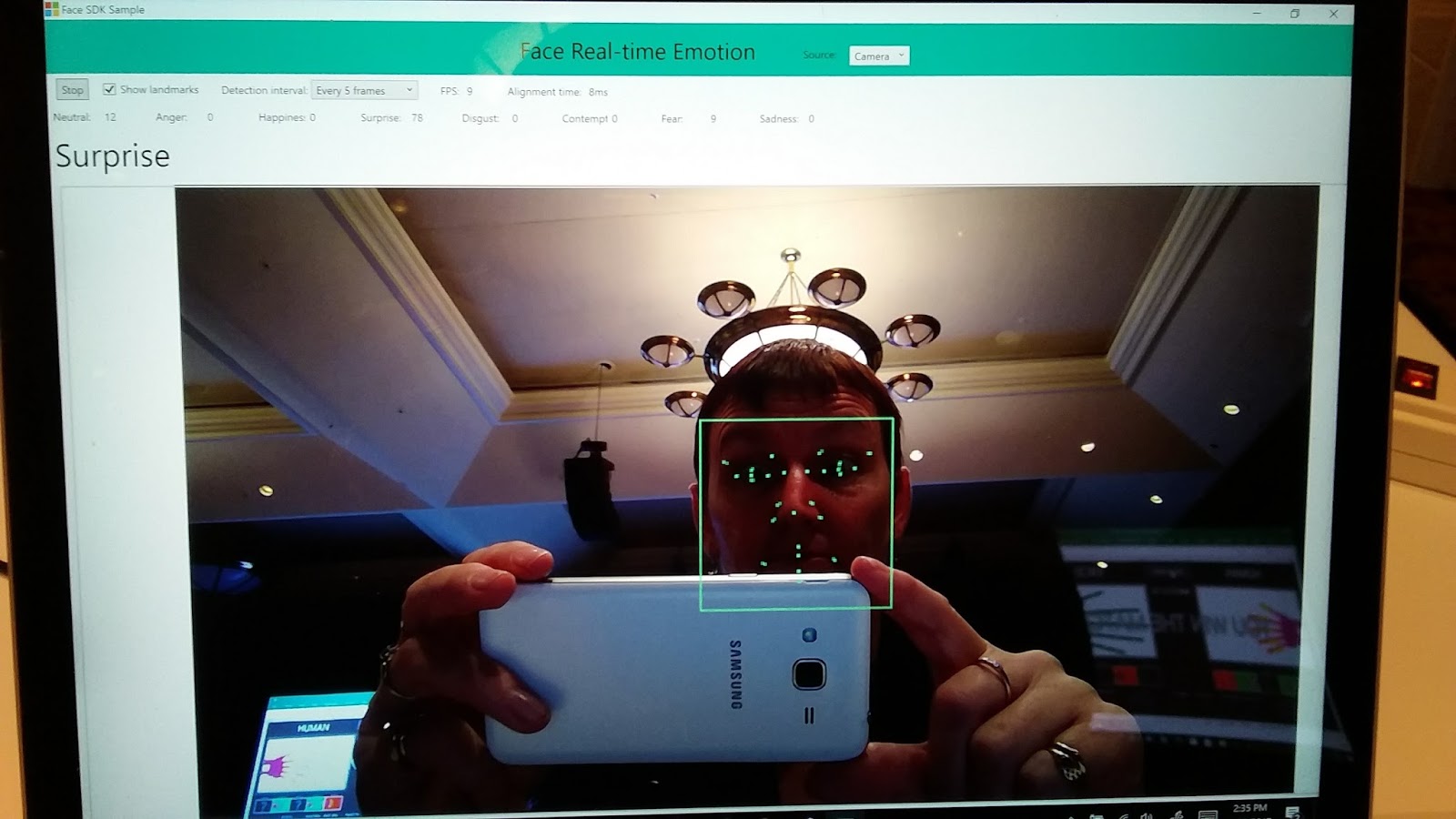
Daniel McDuff, a researcher at Microsoft who spoke at TEDx Berlin, told us about affective computing. This is where technology can understand facial expressions and read student emotions. This can help educators gain an understanding of student experiences via moment-to-moment tracking of cognitive and emotional states. Typically we interact through keyboards but great experiences are multi sensory and multi modal. Capturing information about memory, decision making, communication, and wellbeing is important. Faces convey the experience people are having and they are working on automatically coding this info. Look at a face, analyse and interpret. They look at gestures, the physiology, facial coding acknowledging  as well that it is important to understand context and who the computer is working with. This software means they can tell if facial expressions change so you can tell if the work is boring, exciting or if the student is happy or sad.
It gives the ability to provide people who teach remotely the feedback of how people are taking the information if they switch on their webcam to capture responses during content delivery. This means teachers can make changes as they teach if the student is puzzled or confused. It could also help with the flipped classroom, as you can tell if students have got it and can move ahead. Also, you could pick up anxiety about it. This also means that it can capture aspects of your emotions and tailor the experience for you. They have been working with Hololens to visualize information in real time and I managed to see this in action later in the day. Another thought I had was around students with difficulty reading expression, where one day they could maybe have some glasses that can help read other peoples emotions.
Mike Tholfsen (aka Mr OneNote) then spoke about his top 10 tips for OneNote. His presentation is here.
OneNote is free on every device and every platform and is an amazing programme saving time, helping with organisation and collaboration. I am a big OneNote fan and they just keeping improving it all the time. These were his top 10 things he likes:

1:  Class notebook - class notebook works with a range of LMS around the world so that grades can be put straight in.
2:  Added stickers for teachers to use
3:  You can embed cool things such as geogebra, quizlet, soundcloud, sway
4:  A quick hack. How to quickly make pages – make a table, right click and choose “link to page” and it will automatically make pages for each name in list
5:  Staff notebook – they have a vision for Professional Learning Criteria in this. They have also created help for your Professional Learning Community (PLC). It is in the waffle. If you go to New Group in office 365, create group and choose PLC group you get a notebook with templates.
6:  Export class notebook – really handy when you want to save a copy - right click in your list of notebooks and “save a copy”.
7:  Learning Tools are now built into the online version, also free with word online. Love the Learning Tools!
8: Windows 10 version of OneNote has rainbow ink, fun with ink and reversible ink where you can playback the order of what they did. It’s called Replay when you are looking for it.
9:  Ink to Math – this is great and can even generate graphs automatically.
10:  Writing prompts – this is brand new out this week – aka.ms/writeideas – A great tool for students wanting ideas for their writing.

Some other great things about OneNote (I could go on forever):
- students self-assessing with templates in one note
- give feedback and give support from parent educator like a teacher aid. Don't have to sit next to them if they get embarrassed by that, they can work on the same book at the same time
- Giving feedback by video


What a session – only 2 hours into the day and we were filled with ideas and possibilities. I loved that this was streamed live so other educators around the world could drop in on a part of #E2. Hopefully this will inspire them to be the best they can be and maybe be a part of the Microsoft Innovative Educator network.


Monday, 17 October 2016

Haeata - Connections in week 1

I have been so excited about starting at Haeata Community Campus and was very keen to keep a diary of what I was thinking and what we have been doing and so I decided I would write a bit each day and publish at the end of the week. This is an amazing opportunity to be in at the beginning of a new school, and the process is very different from when you change schools at the end of a year. I have been lucky to be part of this new venture and I am finding it fascinating.

The day before...

After meeting with #ChchEd Educators @paulinehendog, @mattynicoll, @karyngra and @ginippi on Sunday afternoon, I had more questions than answers and the excitement started to build. We had a good discussion about uniform in schools and I found that I hadn't even given a thought as to whether there was a dress code for staff in my new school. I just assumed that I would wear what I normally would for teaching. It was good having Karyn there, so I did get to ask. Interestingly, she said it wasn't something that they had thought about. There are so many things that a new school has to think about, it has been interesting to see what the priorities are as another school had stipulated what they wanted their staff to wear. As Matt was also going to a new school this term, there was talk about the balance of getting to know staff, but also getting on with what we need to do for planning and I look forward to seeing how this pans out in our induction weeks. I am sure my social media accounts will be busy over the next few weeks as I learn new things and get more excited about meeting our students next year.

Day One

Some nerves this morning as I drove over to the old Burwood School site ready for our mihi whakatau. Great to meet with some new staff first thing and then we were welcomed to Haeata.  After our mihimihi Mana Whenua facilitator Corban Te Aika and Mel Taite (SLT) spent time to teach us the waiata that we would be mainly using. Our day was spent getting to know each other. We spent time in small groups, doing the usual icebreaker type activities and the SLT ran some excellent activities. We went outside and did a treasure hunt in teams - a great way to get to know a few of our colleagues and show our true colours (maybe I am a little competitive). There were lots of laughs and a lot of talking. We also got to see the new uniform, which looks really practical and low cost for families. Over lunch, a few of us decided that the getting to know people was quite exhausting. You are continually listening, talking, asking questions and trying to remember names and details. It really was a tiring day.
During the day we were encouraged to ask questions and a few came up over the day, checking if we can blog/tweet, uniform questions, dates and times as well as talking about going into our contributing schools. Many things are still in progress and will take more discussion over the coming weeks.

Day Two

I presented my digital korowai this morning and challenged myself to present something in a way I hadn't done before so did my first Office Mix and made it into a movie. It was good to push myself out of my comfort zone - something I feel we will all be doing over the next weeks. Each day a few of us are presenting about ourselves - a really great way to get to know one another and learn about some of the interests we have.
We then had a presentation and discussion around our values at Haeata. Andy, Cheryl and Haneta from the board talked us through what the school is based on and how the values came about in consultation with the community. There was discussion around PPP - Public Private Partnership which is what this school has been funded by. You can read more about that here.
We watched The Future of Learning and we had discussions around what this meant for us as a school. We watched it again and were encouraged to take notes in whatever way we wanted. Really interesting to see the range of ways people wanted to record their thoughts. My note-taking lives in OneNote and I love being able to write and draw and highlight as I note take. Being able to put pictures in and links is just the best. I would be hard pushed to find another tool that would do all of that!
After lunch we had a "Passion Unconference". This was the opportunity to experience learning about other staff member's passions. We were treated to workshops from playing cards to baking and writing Chinese characters to making Samoan ula lole. A great opportunity to learn more about others and also experience something a little different for ourselves.We were then split into groups and given a packet of pipecleaners and had to create something that was representative of learning at Haeata. Ours showed chaos, infinity, connectedness, strong foundations, collaboration and thinking outside the box.

Day Three

The day started with our karakia and himene (I have been learning a lot in regards to Tikanga Maori and Te Reo)and then moved into a session on Unschooling. We had a lot of opportunities to talk in pairs and small groups about our experiences and in one part to discuss failure and success and what the conditions were to make us meet these two things. Why do we try again and again and then give up? Or alternatively why do we try and try again and keep trying until we succeed? We came up with a lot of conditions that make these things happen. A really good way to see how we can support our learners to succeed. I realised for myself that I often don't risk take for fear of failure and things outside my comfort zone often don't even get attempted. We are all too quick to make excuses - not enough time, not interested and so on.
Andy Kai Fong talked about the cynefin framework by Dan Snowden (place of multiple belongings) and we looked at what each of these areas could look like in a school situation. I felt this resonated as I know I have been in all four quadrants over my teaching time.
We had some time in our hapori today which was good to get to know each other a little better. We played games (cards were a definite hit) and chatted about ourselves.
I had an interesting discussion with some staff at lunchtime around student well-being and was introduced to the Circle of Wellbeing and Achievement which Haeata is using when interviewing parents of new students. This has a really good framework to get to know students and plan goals and strategies to help with the transition into the school.
We had more digital korowai today and it has been great learning about our staff who have been very open in sharing information about their family and their teaching.
The afternoon was about our personal sites that had been set up for us which have our contracts and information and documentation about our reflections as well as space for working towards our Practicing Teaching Criteria.

Day Four

Our first session was on the principles today - Authentic, Connected, Culturally intelligent, Inclusive, Social, Open, Personalised. These are what Haeata is based upon and it was great to have time to learn about and unpack these. Firstly we had blank sheets of paper to write our ideas and unpack each principle. Then we gathered in groups and were given photos that we felt represented those principles and it was interesting to see how people interpreted those pictures and the different ways of thinking. We shared a story each that related to one of the principles and looked at how we would show success in that area. This was a good exercise in working out how we define success. It made me think more about what success is and how our students show that. In groups we also made a slide show with a quote, definition, song and slogan about one of the principles. This let us unpack them a little more as well as get to know more staff. I felt that the principles are all interconnected and felt good about how they would impact on our teaching and learning at Haeata.

Day Five

Today was a different day. We started with a shared breakfast and then had an Amazing Race. We were split into different groups yet again and sent off around Christchurch to find a range of items, build sandcastles and meet people in businesses. The highlights would have to be one of our team removing the required chicken feather from a dead chicken, pretending to be sheep on the side of the road, meeting some amazing people and convincing tourists to have their photo taken with us. We came back for a BBQ lunch then worked together on a presentation for the rest of the staff on our excursion.


This week has been like a huge week of professional development. My daughter thought it sounded like a school camp and in some ways it was. We had time to socialise, to connect with one another and learn about others as well as ourselves. We are very lucky to have this opportunity.  I certainly felt that my brain was about to explode a few times. However, it has been a very rewarding week and I know that I feel connected to staff and to this amazing new school, Haeata.


Monday, 3 October 2016

Moving Schools


Ah, the joy of moving schools. So many things to tidy up and sort, so little time to do so. After a very hectic Term Three, I finally had some time these holidays to pack up and get ready to move on to my new school, Haeata Community Campus.

So, clearing out things and digitally sorting things meant I found out all sorts of interesting facts which I thought I would share. I didn't want others to go through the same difficulties and some of the ideas might allow you to prepare yourselves early if you are thinking of leaving.

I started by tidying up my desk and my corner in the office.
I was amazed how little I took away with me. I remember in previous schools having large amounts of books and folders to take with me, but now almost all that I do is online and I only took a couple of bags of my books away with me. I was stunned. There was also very little rubbish - I got a recycle bin in, thinking that I was going to fill it with junk but really only had a small pile of paper to throw away.
But wait - the digital me, that is a different story. Where to start...
Making sure someone has the passwords to the sites I used for school. Changing the Admins on the Facebook pages. Making a list of all those subscriptions I have under my school address and changing them all over. I now have a gmail account for all those in future - I call it my Music Sue account so I can subscribe to lists, still get all the information, but don't have to change everything if I move schools again. This goes for my Microsoft Educator account, my TKI lists - everything to do with work. I had already made sure Twitter and my blog were on a different account, but I should have made this extra one a long time ago! It also gave me an email to give to staff to keep in touch, rather than giving my personal one, or my new school one (which I didn't know at the time).I also use it for my Youtube channel, putting up music instruction videos that I make using StaffPad.

 Reminder: Make a "work" email to use for subscriptions.


I had great difficulty trying to copy files from my OneDrive when they were not synced to my computer due to syncing problems with the Surface Pro4. I got around this by using a different computer and syncing that so I could just drag them onto an external hard drive. Also, huge problems with the new Sharepoint - FINALLY (and I mean hours) worked out I had to be in Internet Eplorer to enable the "Open in Explorer" button to work (which was one fix I found) then found out you can't download more than one file at a time anyway! Grrrr - spent a good few hours downloading files that I had put up to share with others and not saved elsewhere. **Update - just managed to move my Sways to another account - get the shareable link, then open in your new account and duplicate. Phew :) But it has also made me realise how easy it is to use someone else's Sway. More thought required about using Sway.

Reminder:  Don't save just in Sharepoint.


Oh, the next school is a Google school so that won't be an issue there, but down the track I hope Microsoft sorts that!
Exporting OneNotes worked well - easy to transfer sections, and whole notebooks. Love OneNote - have I mentioned that before?

Plants - I had a real dilemma about whether to take my pot plants or not - I don't have room for them at home and my new school is not built yet so I decided to leave them. I hope someone waters them.

The first few days of the holidays I spent doing marking (students handing in work on the last day of term!!), helping set up the teacher trainee who is taking my classes so she knew what to do for the four weeks of seniors in Term 4, and helping run the auditions for the Shcool of Music for 2017. Still doing what I called a brain download - trying to make sure that all the information I know is transferred across. Difficult when you are in charge of an area. I had started to write "how to" sheets, but never managed to do all of them.

Reminder: Make "how to" sheets wherever possible - for everything!


The last week of term was full of farewells, made a little tricky as I was away for a few days - although it seemed to make it easier for the staff and students to plan evil things for me! Reminder - do not go away for a few days in the week you leave a school.
The staff meeting on Wednesday morning was lovely, some awesome words spoken and nearly a tear shed - tried hard to keep it all together! The Performing Arts staff gave me a lovely bottle of whisky which I am keen to crack open with one or two of them around to help me. From the Hagley staff I got a beautiful pounamu bracelet and earrings. A lovely gift and something I will cherish as I move on.
That evening was our music showcase concert. I had an inkling that something might happen as one of my groups was last on the programme, which was unusual. It was a real pleasure to conduct the Junior Jazz Band for the last time and I was so proud of all the students over the evening. A few of the students gave me some really heartfelt words and the tears welled when the audience gave me a standing ovation in the middle of the evening. So, the final item came, my group sang but they didn't leave the stage. Sure enough, the planning had been done - Nanako Sato, a most amazing music teacher, had written a version of Supercalifragilisticexpialidocious for the students to sing and play for me. They'd been rehearsing all week - easy, since I was away! I was blown away and the flowers and gifts were amazing. It was a really special evening.

Reminder: Do not go away the week you are leaving.


Then I had drinks after school on Thursday where a few of my dearest and finest colleagues gathered and we had a good chat. Many of my students gave me gifts and the wine, flowers, chocolates and my blue teddy are all amazing. On the final day I was called out of class to "shift my car", only to find it covered in Gladwrap with beautiful messages all over it. The boys were close by filming my reaction and gleefully posted it on Facebook. Lucky I just smiled at them....
The cards and gifts were overwhelming and I really felt quite emotional all week. Part of me so excited about my new job, part of me sad to leave such amazing students and staff.

My holidays are full of two things:
My teacher side: professional reading, learning more Google Apps, writing blogs, learning to use my new Mac, Tweeting, and sorting my digital self so I can find things easily.
My personal side: spending time with my children, painting a bathroom and gardening for my mother, gardening for me, reading and getting the pool ready for swimming.

 I'm excited about my new job and look forward to learning new things. Bring it on.

Thursday, 8 September 2016

Microsoft Tips

As an MIE Expert I am lucky to attend some amazing sessisons with other MIEs and with Microsoft staff. We had a Microsoft Teacher Talk in Christchurch where we were given an overview of Microsoft products and the chance to throw some ideas around.
Having used most of these products for a while, I didn't take copious amounts of notes, but as always there were a few tips that I found really useful and wanted to share with others, so here they are.

OneNote - I use this all the time, but am always learning something new.

    Image result for onenote
  • You can pull text out of an image by right clicking on the image and right at the bottom there is "Select Text from Image". I didn't see it there when I had the Onetastic addin disabled, so you may need to download and enable it to have this option.
  • Use the Learning Tools Dictate feature to scribe audio from a video. Run the video on YouTube while recording and it will write the text for you.
  • If you right click an image and "Set Picture as Background" you can annotate it without it moving around.
  • Don't forget to use the Audio recording for feedback. You can annotate at the same time and it links the audio to the annotations. If you are having problems with work on multiple pages, go to File>Options>Advanced>Printout and untick the "Printouts on Multiple Pages" box.
  • Remind students to copy their written work before they highlight or make changes, then you can see the progression.
  • In the Class Notebook you can distribute sections and pages to a small group within your class.
  • You can add a Teacher only section to an aleady made Class Notebook. Under Class Notebook go to Manage Notebooks, choose your note book and Enable Teacher-Only Section.
  • Use OneNote for Teacher Appraisal.
  • Only comment for improvement is it would be nice to have the full functionality of the Word spell check within OneNote.
Image result for officemixOfficeMix - I haven't used this yet, but some of my colleagues have, with good success. Keen to have a closer look when I get some time.
  • Download this  into Powerpoint - not available for Mac yet.
  • If you write in the notes section of your Powerpoint, these will come up when you record, so you can read them while you record.
  • If you want to take a small section of a video, you can do a Screen Record into your powerpoint, or you can right click and save it as a short clip for later use.
  • When you upload to OfficeMix make sure you save the settings for students to sign in, then you will get analytics.
Snip   - I use this all the time, and love it!
  • Download and have it sitting on the side or top of your screen for easy use.
  • Use it to create little snips to explain short concepts.
  • Great for annotation of screen clippings.
  • Use the whiteboard to draw on then save.
  • The library in Snip saves all your snips for quick access.
Sway - love this alternative for presentations
    Image result for sway Microsoft
  • Great for collaboration of Authors.
  • You can share and enable students to duplicate your Sway so they can add to it. Share>More Options> Duplicate.
  • Drag and drop photos in to make a quick newsletter for parents and community.
  • Good for portfolios. Can show the before and after of art work with the slider.
  • Use like a blog for a school trip, share with parents so they can keep updated.
  • You can use this offline, download the app from the store.
  • It is Mac friendly, but one teacher mentioned that students couldn't edit on their phones.
Classroom and Teacher Dashboard - a quick discussion was had about both of these, although no-one was using in any depth. Definitely in the beta stage where we are experimenting and seeing what works. It was good to hear that Microsoft have been working with KAMAR to get these linked together.
Tasks - This looks good to use when planning a group event such as Prizegiving or a production. Good to be able to allocate tasks to staff. It would be good to be able to allocate tasks to more than one person.

Forms - I have done a couple of surveys and quizzes using Forms - so far so good.
  • You can now add points to questions.
  • You can turn the link into a QR code which I like.
  • Great for surveying the community.
  • Good visuals - yu can see it updating if you do it live.
  • You can export as a spreadsheet.
  • You can delete a particular student response, if you have set the survey for students to sign in.
  • A few things that are still needed - the ability to co-author, to duplicate and to stop people voting more than once.
Educator Community - I have learnt so much on this site!
  • Plenty of Courses and Resources.
  • Loving the new layout and look.
  • The 21st Century Learning Design Pathway comes with it's own OneNote which has rubrics to code your activities to see how well you are using tehnology.
  • There are webinars to watch.
  • It's a good idea to use your home email to sign up, this makes it easier if you change schools. 
I ran a quick session on using StaffPad - an amazing app for SurfacePro that is a great tool for teaching music. 
Overall, a great session and I have a few more tips and tricks to add to my bag. I am keen to give OfficeMix a go - that will be a holiday project.

Friday, 20 May 2016

Teach Meet Christchurch

What a great afternoon. I really enjoyed having the opportunity to be in a room full of keen and motivated teachers who wanted to learn and wanted to share. This is my brief summary of the session, mainly for my own review, but there were a few things that I thought might interest others, so here it is in public.

Wilj Dekkers from STAC - Minecraft for Creative Writing


Wilj started by showing us a clip, The Piano , that he uses for students to be inspired to write about. I loved this idea and wished, just for a short moment, that I taught English so I could use this.
He talked about creating a Kiwiana theme park where students used Minecraft to create it and then they shared their learning with parents.
Picture by hobbymb
Using Pick a path stories, the students would write a story,  then create the world in Minecraft and then review the story. He found that using Minecraft helped write more content and more quality.
This year he has done this the other way. The students have made a rough sketch, then planned the story with Minecraft. He has seen the increase in motivation.
Maybe I do want to teach English....  no, maybe not.


Tom Neumann  - Riccarton - Using an alphanumeric self marking video game in Moodle to review content of Yr11 Economics (or any other subject)


Tom showed us a video of how he uses games for learning.
He has found that students are fully engaged and have total concentration for games. He says that they will keep trying to achieve, which I have seen before with gamification - suddenly students are not as worried about failing, they just keep trying until they get it right.
Using games and music for learning definitely strikes a chord with many students. I would like to investigate this further when I get time.


Sue McLachlan - Hagley - OneNote Learning Tools. 

I am passionate about these and feel they have a huge potential for classroom use. This was my presentation so I didn't take notes...
My Sway (awesome Office365 tool for presentations) can be found here.

Karen Gray - Haeata - Personalisation of Learning

Karyn talked about Personalization/Differentiation/Individualization and designing learning programmes that are flexible and responsive. It must be very exciting starting a new school with a clean slate to work from. She had many questions to ask of us as well and this is a great forum to share ideas.
#BFC630NZ - breakfast chat on Twitter at 6.30am each morning that is worth looking at. I may have to rearrange the shower order in our house so I can get to one of these, otherwise I will be a lurker and check them out later in the day.
She also talked about using the best device for the learning at the time rather than using 1:1

I loved the quote she used at the end:

John Holt - a perceptive educationalist


‘It would be to let every child be the planner, director of his own education, to allow and encourage him with the inspiration and guidance of more experienced and expert people, and as much help as he asked for, to decide what he has to learn, when he is to learn it, how he is to learn it, and how well he is learning it. It would make our schools,..... a resource for free and independent learning, which everyone in the community, of whatever age, could use as much or as little as he wanted.’


Tam Proctor - OneNote as a teacher planner

http://tamypblog.blogspot.co.nz/
As I use OneNote all the time, this wasn't new to me, but a couple of things were reminders for me to look into. Using templates - I really don't do this enough. also, being able to hyperlink to other pages is something I need to look into. I also need to use tick boxes more.
For each class, she plans with 3 sections - Content, Observations and Reflections. A good habit to get into.

thinkers_keys.jpg

Shira Withers - Our Lady Star of the Sea - How we as educators can help students with low working memories improve their self-management skills using digital technologies, thus  allowing them to experience success and move from a fixed to growth mindset.

http://mindlabassessments.blogspot.co.nz/

For self-management skills, Shira has the students using TrelloShe also uses colour coded Google Slides Timetable in which they can add a daily or end of week reflection. This helps students to stay focussed.
She mentioned Tony Ryan's Thinking Keys which I hadn't heard of.

Donna Jones -STAC - Using a 3D app to inspire creative thought and ideas for creative writing. Primary and secondary.

Donna showed us the app Quiver, which you can download for free onto your phone. You print off pictures from http://quivervision.com/ colour them in then use the app which will bring them to life.
She says that the student's writing gone to another level as they can see things in 3D.
She uses it for fantasy writing, science and geography as well. A great tool to inspire students.

I've gone mad on this. I loved the colouring in for a start, then had a great time showing everyone how it worked! I even coloured my Pukeko with black and white stripes to make sure it really did render the colours that I had chosen. It looks very cool! Some of the pictures cost, but there are many free ones to try this out. This has huge possibilities and I can see it being a very useful app. The next step is to see if we can commission specific graphics for topics....

Sam McNeill - STAC - Google Earth - adding images and doing Google tours

Sam had his students using GoogleEarth to do a tour of the Karate Kid clip. Students made their own tour of places in the movie. One device between groups. He showed us that you can add images to the tour to make it very interactive. This looks like fun - where to next??


Overall, I found this a really inspiring learning experience. Lots to listen to, lots of ideas and motivated, forward thinking teachers. Looking forward to the next one to be hosted at St Andrew’s College on Thursday 11th August starting at 4:15pm. For more information, check out TeachMeet Christchurch. If you can't make it, you can also follow on Twitter #TMChch.